Sam Afshari's Notes - Contact me: sa at neat.lu
👀 Notes on this right here page 🤠
- 2026-09-02 | Algorithms is out now!
- 2026-08-15 | Thermal Runaway is out now!
- 2026-07-23 | Froggy Works Demo is out now!
- 2026-07-21 | SYSCALL: RING ZERO is out!
- 2026-07-20 | How Lockstep Multiplayer Works in Generals64
- 2026-07-19 | Building Fast Sound Library
- 2026-07-13 | How Multiplayer Works in Froggy Works
- 2026-07-07 | Roads in C&C Generals
- 2026-07-02 | AI Decision Making in Generals
- 2026-06-30 | The UI System in Command & Conquer Generals
- More Notes
- The built-in C frontend parses the source and emits instructions for the Algorithms virtual machine.
- The judge creates a fresh machine for each test, copies the input into guest memory, and calls the solution's
solvefunction. - Each problem declares whether its answer is a return value, exact console output, or both. The judge compares the result accordingly.
- The complete deck includes the visible examples and hidden cases. Every test must pass before the run is accepted.
- Collect commands from every player.
- Confirm the expected command counts.
- Sort the combined list deterministically.
- Execute the list on every machine.
- Advance the simulation by one logic tick.
- Predict and apply the command locally.
- Render the local result immediately.
- Wrap the command with the player's stable owner ID.
- Send it to the coordinator over WebRTC.
- Validate and relay it to the other peers.
- Apply it to each peer's local simulation.
FLAG_ROAD_CORNER_ANGLEDasks for a hard miter rather than an inserted curve;FLAG_ROAD_CORNER_TIGHTselects the smaller curve radius;FLAG_ROAD_JOINallows an open end to blend into another road type;- the two road-point flags distinguish these records from ordinary map objects.
AIData.inicontains global timing, economy, targeting, and faction data.AISkirmishPlayermanages the base, production queues, enemy selection, and completed teams.- Skirmish scripts and team templates decide which team is useful and what it should do.
- Each object's
AIUpdatestate machine performs movement, guarding, hunting, and combat. - A script-requested priority structure wins over an ordinary automatic structure.
- If the player lacks sufficient power, a power-producing slot is forced ahead of the normal choice.
- An unfinished structure is resumed, and a replacement dozer or worker is requested if its builder died.
- A destroyed or captured structure waits for its rebuild delay before becoming eligible again.
- Only one structure starts during a construction pass.
- data defines faction economics, base slots, team compositions, and tuning;
- scripts define intent, timing, and reactions;
AIPlayerturns intent into construction and production queues;AIUpdateturns orders into movement and combat.WINDOWTYPESCREENRECTNAMESTATUSSTYLESYSTEMCALLBACKINPUTCALLBACKTOOLTIPCALLBACKDRAWCALLBACKTEXT- per-state colors and images
InGameUIowns selection state, pending cursor commands, floating text, messages, placement feedback, subtitles, and the tactical view.ControlBarbinds selected objects and player state to the windows created fromControlBar.wnd.Radarowns map sampling, radar objects, events, coordinate conversion, and visibility policy.- device-specific callbacks draw custom regions such as the radar and power meter.
- message translators turn UI intent into game messages.
- no selection produces the empty context;
- several ordinary units produce multi-select;
- an unfinished object produces under-construction;
- a garrisonable structure can produce an inventory context;
- an object with an OCL update can produce a timer context;
- an object with a command-set name produces the command context;
- beacons and observers have their own paths.
- The window manager sends mouse messages to
GadgetPushButtonInput. - The gadget sends
GBM_SELECTEDto its owner. ControlBarSystemforwards ordinary command controls toprocessContextSensitiveButtonClick().- That function calls
processCommandUI(). processCommandUI()reads the attachedCommandButtonand validates the current selection and command state.- WND data defines persistent hierarchy and authored geometry.
GameWindowManagerowns lifetime, stacking, focus, capture, modality, routing, and traversal.- gadgets implement reusable control behavior.
- callback lexicons bind data names to compiled code.
WindowLayoutmanages screen lifetime.InGameUIowns tactical and selection-oriented client state.ControlBarprojects game state into a context-sensitive retained panel.Radarand other specialized systems draw dynamic content inside assigned windows.- the message stream separates UI intent from deterministic simulation changes.
Algorithms is out now!
Algorithms is out now on Steam for Windows and Linux.
It is a native, offline algorithm practice application built around a short loop: read a problem, write a solution in C, run the complete test deck, and inspect the verdict. There are no accounts, subscriptions, or remote judge servers. The compiler, machine, problem bank, and judge all run locally.
The Steam package includes two applications: Algorithms Pro and Algorithms Retro. They present the same 188 problems in two different workbenches, but share the same compiler, virtual machine, judge, solutions, and progress.
Algorithms is available on Steam here.
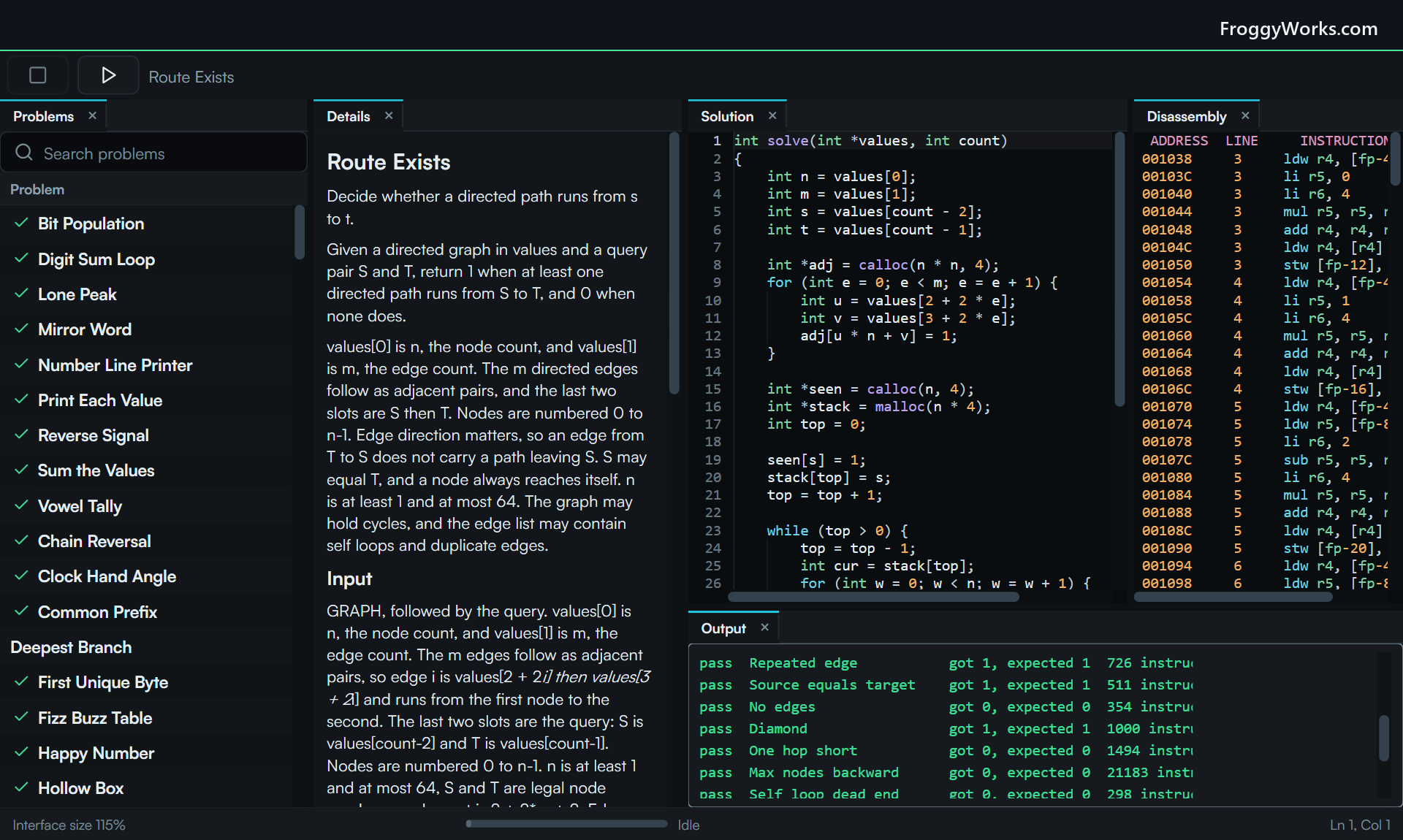
One product, two workbenches
Algorithms Pro is the modern side. I built its interface with FUI, my retained-mode native UI framework. The application has dockable panels for the problem catalog, statement, C editor, disassembly, and output. Search can filter the bank by text, category, or difficulty. The editor has completion, diagnostics, formatting, find and replace, and the keyboard commands I expect from a desktop code editor.
Algorithms Retro contains the same practice system in an IBM VGA terminal workbench. It can look like a black-and-green terminal, an early Windows machine, or a monochrome workstation. This is not a separate problem set or a simplified edition. It compiles and judges the same source against the same test data.
Both applications open the same solution files and progress record. A problem solved in Pro is solved in Retro. Code written in one opens in the other. Only the presentation settings are separate, since a docked desktop interface and a terminal interface need different configuration.
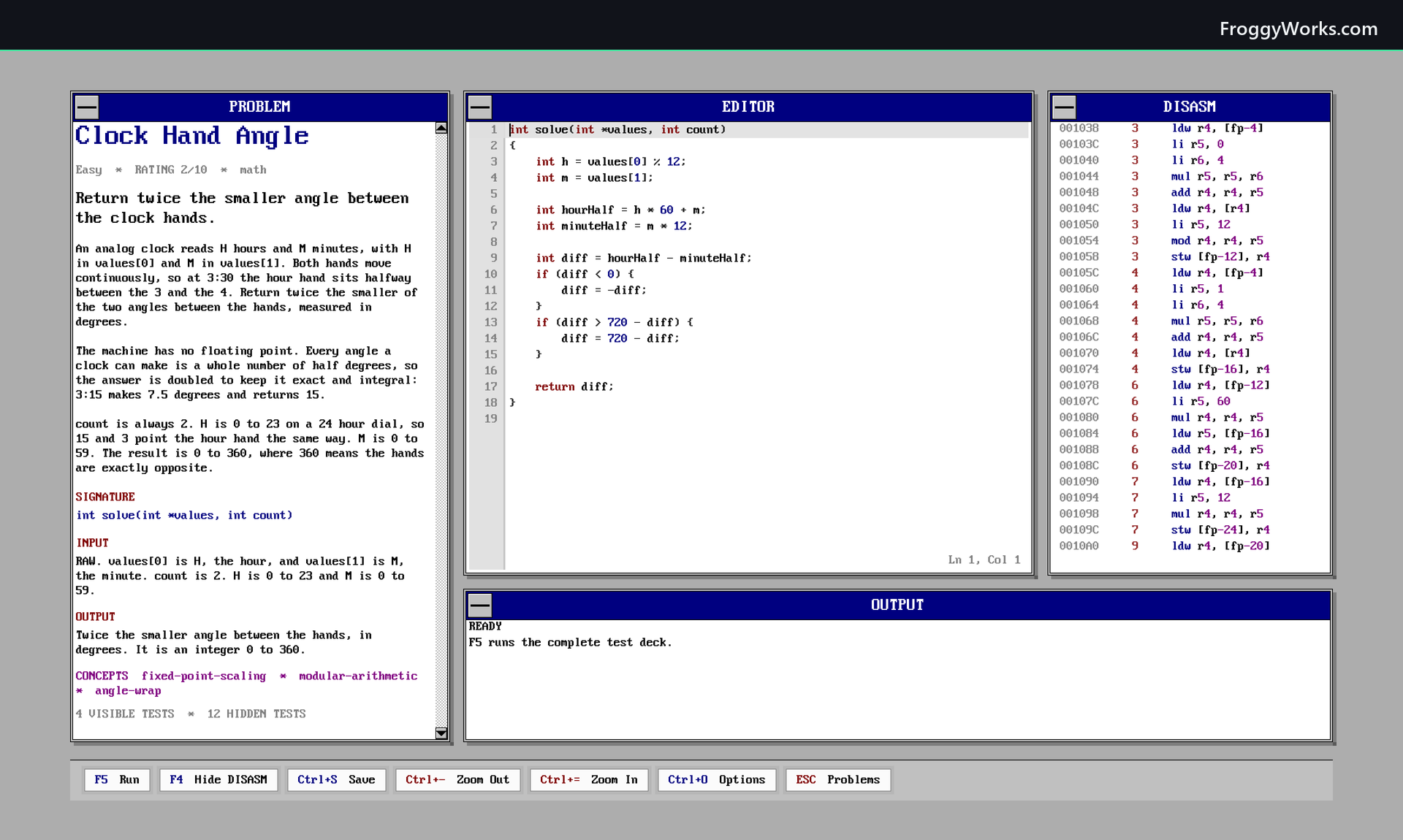
How a run works
The catalog contains 188 problems across 20 categories. It starts with small exercises and continues through arrays, strings, trees, graphs, dynamic programming, backtracking, parsing, bit operations, scheduling, and systems work. The current bank has 70 Easy, 104 Medium, and 14 Hard problems.
Opening a problem gives the editor a C function stub with the signature the judge will call. Pressing F5 starts one complete run:
The output panel keeps this concrete. It lists every test, the observed and expected result when they differ, any machine fault, and the instruction count. An accepted run records the number of tests passed, the total instructions executed, and the compiled code size. The solved checkmark in the catalog is simply the result of that complete deck passing.
There is no call to Clang, GCC, or MSVC in this process. The C compiler is part of Algorithms. It reads one source unit and targets the application's own 32-bit instruction set directly. Common include lines are tolerated for pasted solutions, but there is no host header or filesystem behind them.
Deterministic judging
Online judges usually measure elapsed time. That makes a limit depend on the server, current load, and implementation details outside the submitted program. Algorithms uses an instruction budget instead.
Each test gets up to 2,000,000 instructions. The virtual machine has 16 MB of guest memory, sixteen 32-bit registers, a checked 1 MB stack, a separate call stack, and a 64 KB console limit. Loads and stores check their bounds and alignment. Null access, division by zero, stack overflow, invalid frees, and nonterminating programs produce named faults rather than reaching host memory.
The machine has no clock, random source, network access, or host access. Runtime services such as memcpy, memset, allocation, and console output are charged against the same budget as ordinary instructions. The same source and test therefore produce the same verdict and instruction count on Windows or Linux, on a fast machine or a slow one.
The judge advances execution in bounded slices. A long solution can be stopped, the interface remains responsive, and resuming a slice does not change the machine state or final count.
Reading what the compiler produced
The disassembly panel is part of the main workflow rather than a separate developer tool. Every emitted instruction carries its source line and origin. Moving the caret in the C editor highlights the instructions generated for that line, which makes the cost of a loop, comparison, memory access, or function call visible.
Source-only mode hides compiler prologues, epilogues, and runtime wrappers. It leaves the instructions produced by the written C and any inline assembly, so the listing remains readable. The complete listing is still available when the implementation details matter.
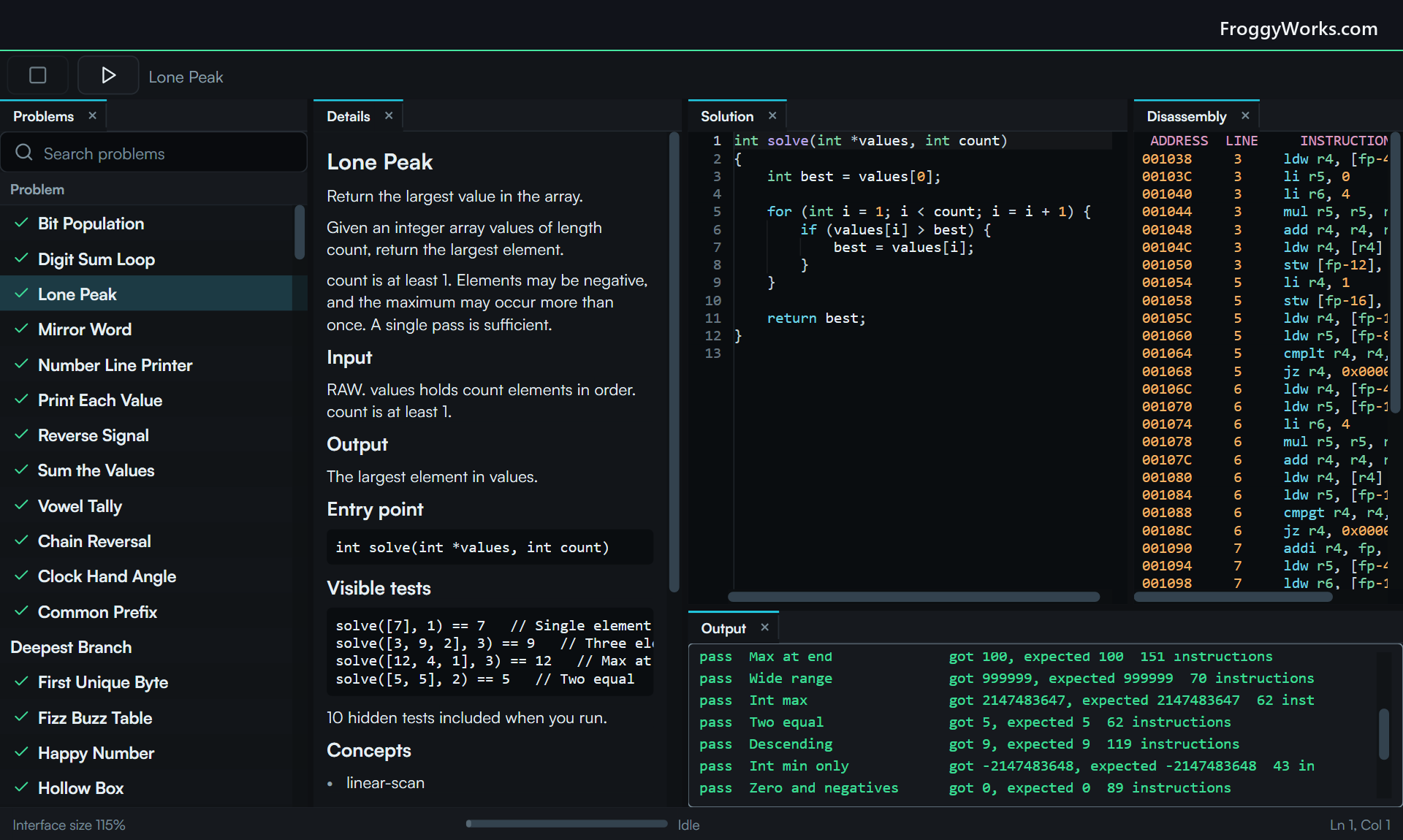
The supported C subset is deliberately documented and fixed. It includes integer types, pointers, local arrays, functions, normal control flow, allocation, memory operations, formatted output, and inline assembly. It does not quietly fall back to a host compiler for unsupported features. The compiler reports a specific diagnostic instead.
Keeping the two applications honest
Shipping two interfaces is useful only if they remain the same practice environment. Algorithms Pro owns the compiler, judge, generated problem bank, and shared save contract. The Retro tree carries a byte-identical mirror of those sources. A synchronization check is part of the publication gate, so a compiler fix or catalog change cannot be released on one side alone.
The problem catalog is generated into C++ and checked into the build. This keeps all statements, examples, hidden tests, reference solutions, categories, and difficulty ratings inside the application, with no service to contact after installation.
Solutions are ordinary .c files saved automatically as I type. Progress is a small versioned JSON document. Before writing progress, either application merges the solved set already on disk, which prevents one interface from erasing work recorded by the other. The write path uses staging and replacement rather than truncating the live file first.
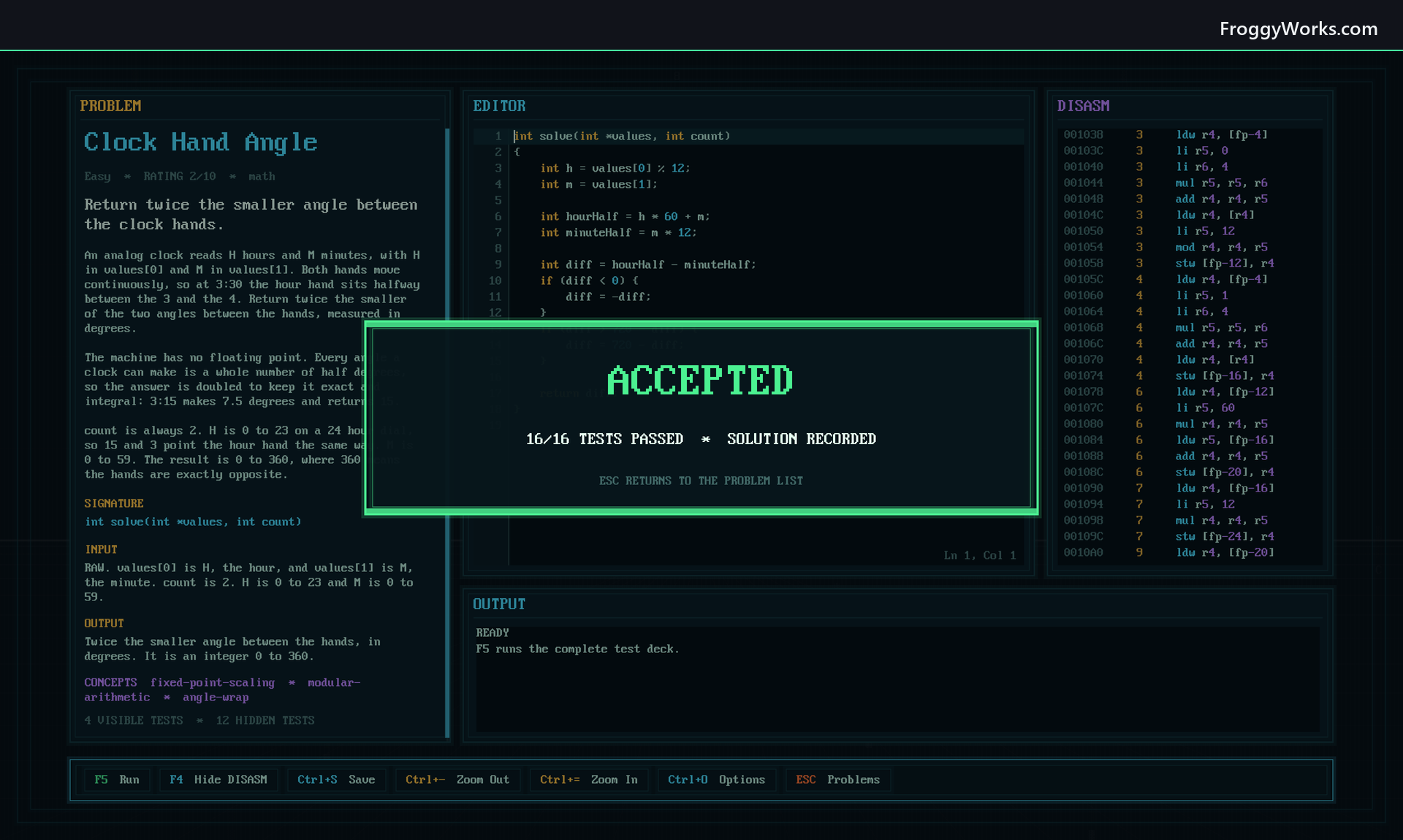
Algorithms began as the compiler and judge behind an earlier project. For this release I separated that machinery from the surrounding game, reduced it to one documented C language, built a professional workbench around it, and then gave the same core a second terminal presentation. The result is a local practice environment where the verdict can be inspected all the way down to the instructions that produced it.
Thermal Runaway is out now!
Thermal Runaway is out now on Steam for Windows.
I built it as a modern arcade version of Mirror Maze, the shareware game Dave Edson released around 1989. The basic idea still feels unusual today: the spark moves by itself, and the player does not steer it directly. One input flips every reflecting switch on the circuit board at the same time.
That sounds simple until the board starts filling with switches you created, the timer is running down, and several other sparks are crossing the same routes.
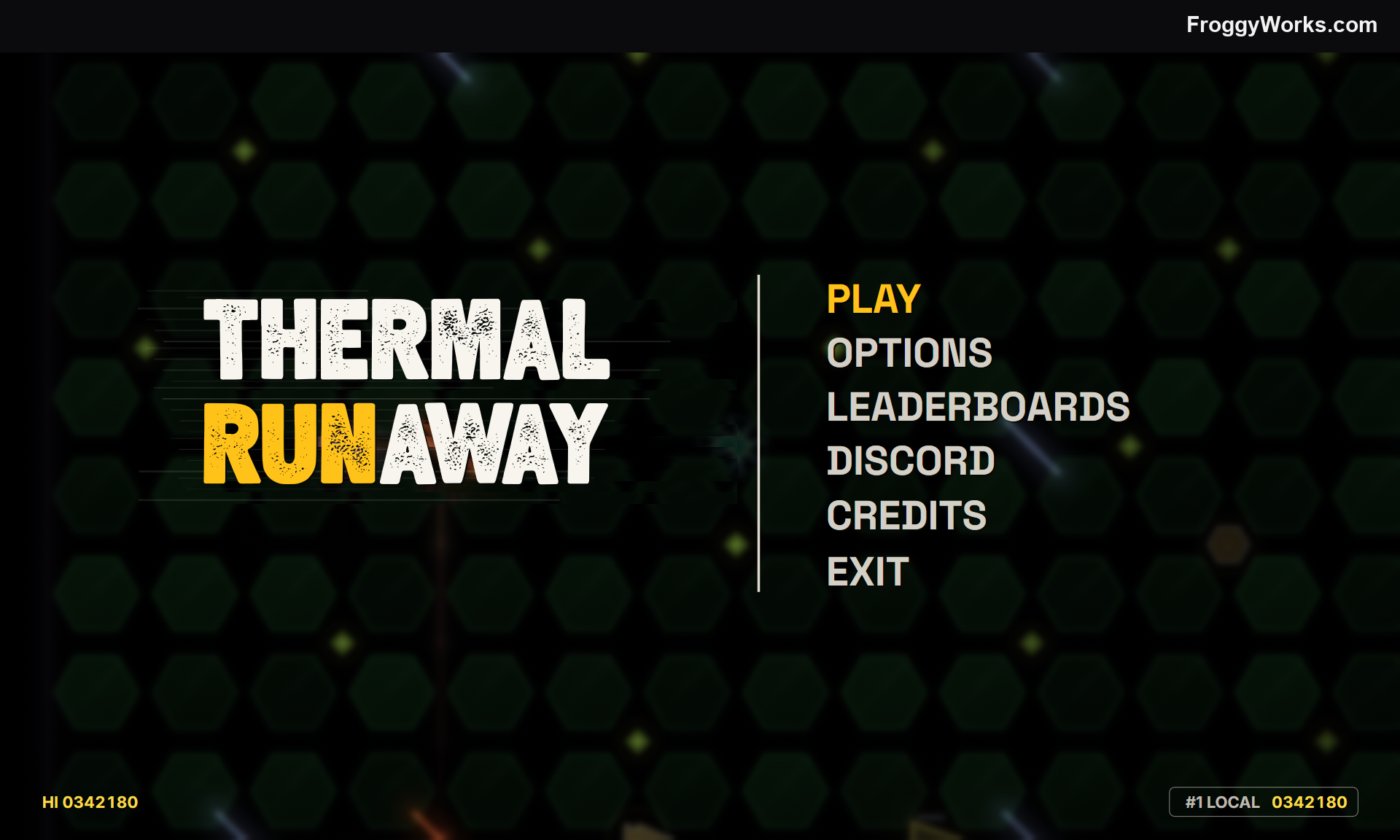
The visuals, especially the Spark are inspired by the opening credits screen of the Halt and Catch Fire TV show.
How the game works
A hot spark runs along the traces of a circuit board. Reflecting switches turn it by 90 degrees. Pressing the flip button rotates every switch, so a safe route on one side of the board may change at the same moment as the route directly in front of the spark.
The goal is to collect every loose particle before time runs out. A collected particle does not leave an empty space. It becomes another reflecting switch in the current flip phase. The board therefore changes as it is cleared. Every successful route adds another decision to the routes that follow.
Particles score 10 points multiplied by the current chain. Collect another within two seconds and the chain rises, up to x8. Let the window lapse and it returns to x1. Clearing a board also converts the remaining time into score, so slowing the spark down makes a route easier to read but reduces the clear bonus.
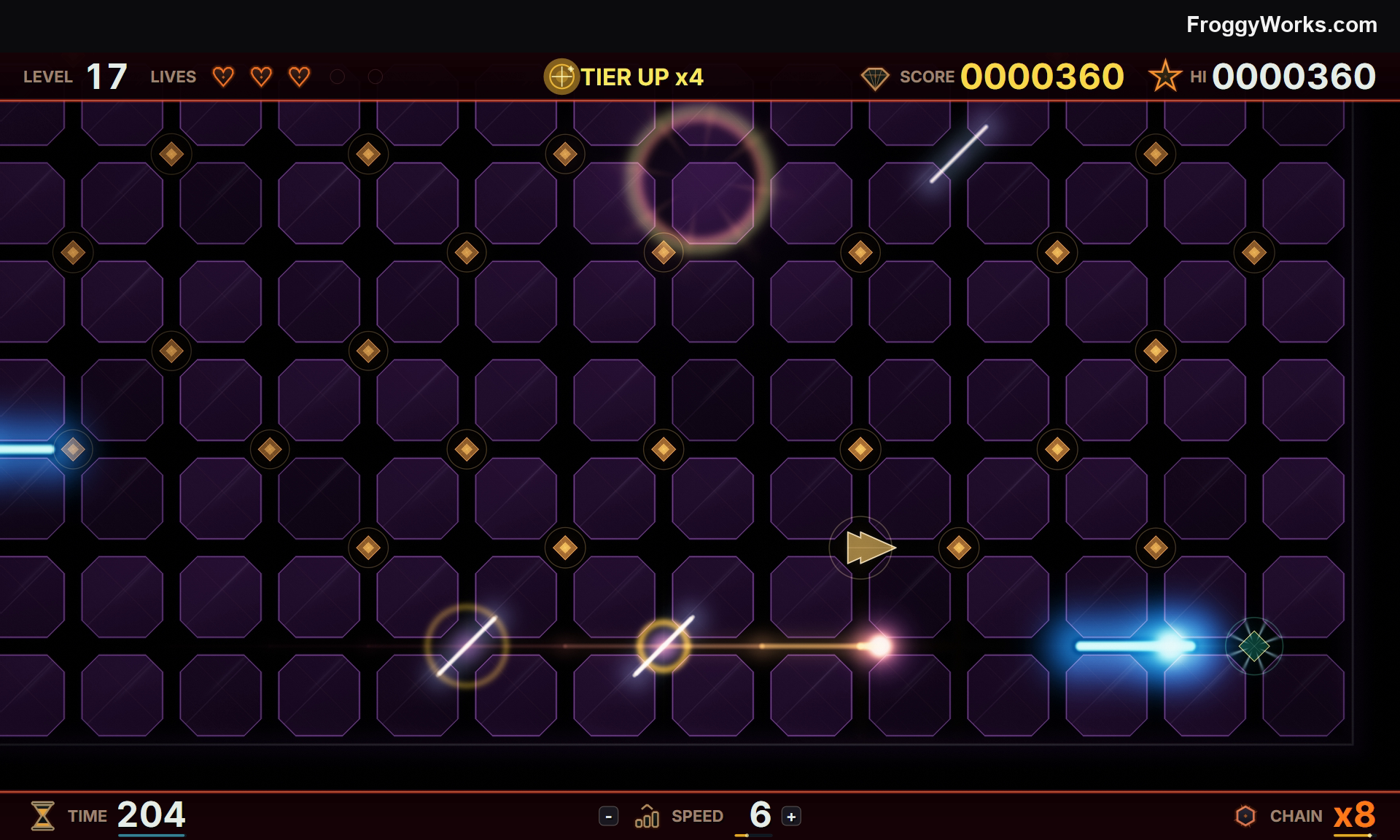
The spark is moving along the lower trace here. The white diagonal blades are the reflecting switches. A flip changes all of them together.
The later boards add one-way diodes, capacitors that place new particles, vias that teleport the spark, walls, and several kinds of hostile interference. A drone follows the same paths as the player. Smarter sparks ignore the switches and hunt directly. THE ARC follows the board but heats every switch it touches until the route breaks for a few seconds.
There are still ways out when the board becomes crowded. The player can hold the INVISO shield to pass through a dangerous spark, or teleport to a safe intersection. Speed remains under direct control. Those tools do not solve the route, but they give enough room to recover from a bad flip.
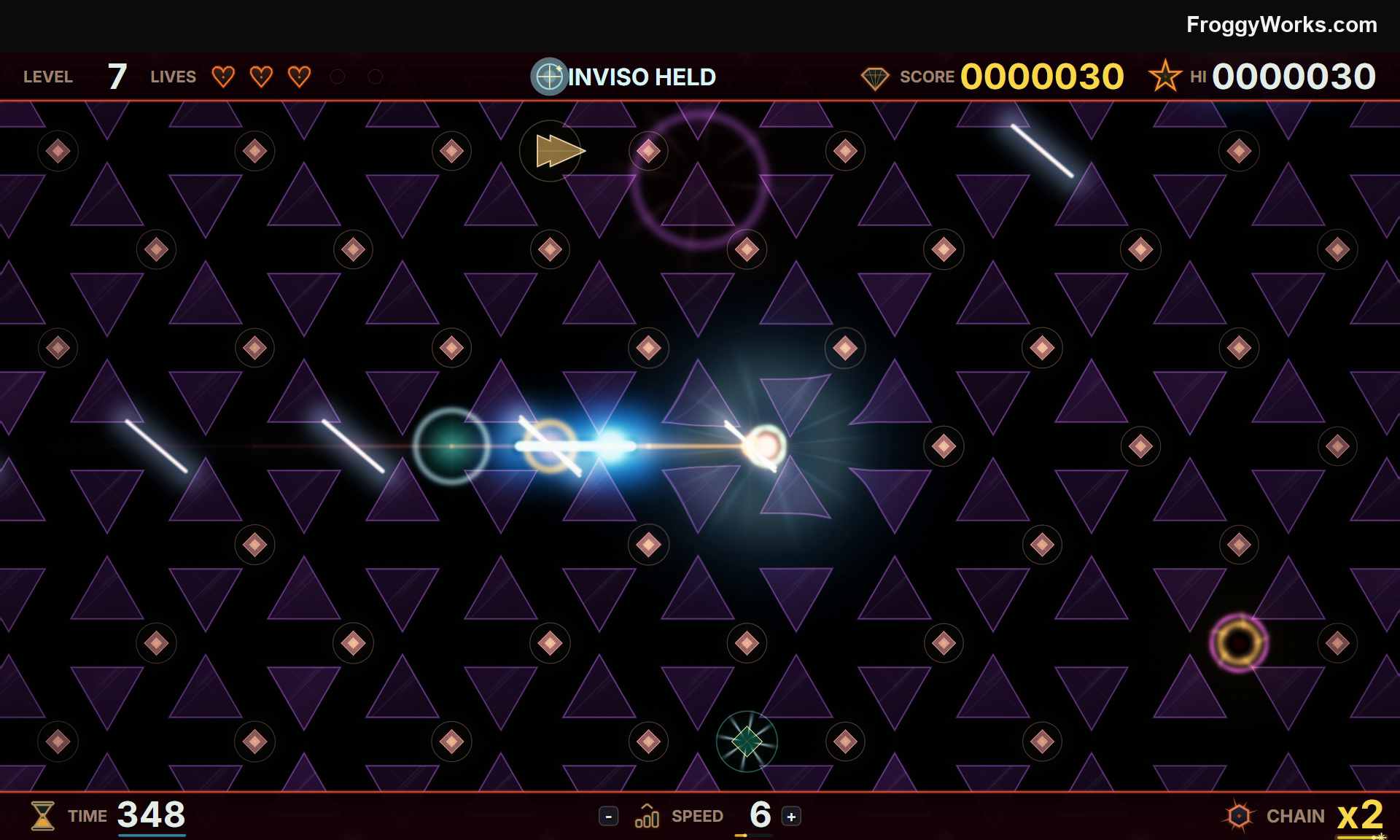
INVISO is held rather than toggled. Its charge is part of the simulation, so it is useful for crossing danger but cannot be left on permanently.
Every third level is a bonus stage. Deeper runs cycle through named board recipes including ARC LIGHT, VIA MAZE, DIODE GRID, CAPACITOR RAIN, SPARK STORM, BLITZ, and THE YARD. Some late bonus stages remove the particles entirely and replace them with a moving gold spark. Catching it scores, then sends it to another distant part of the board until the clock expires.
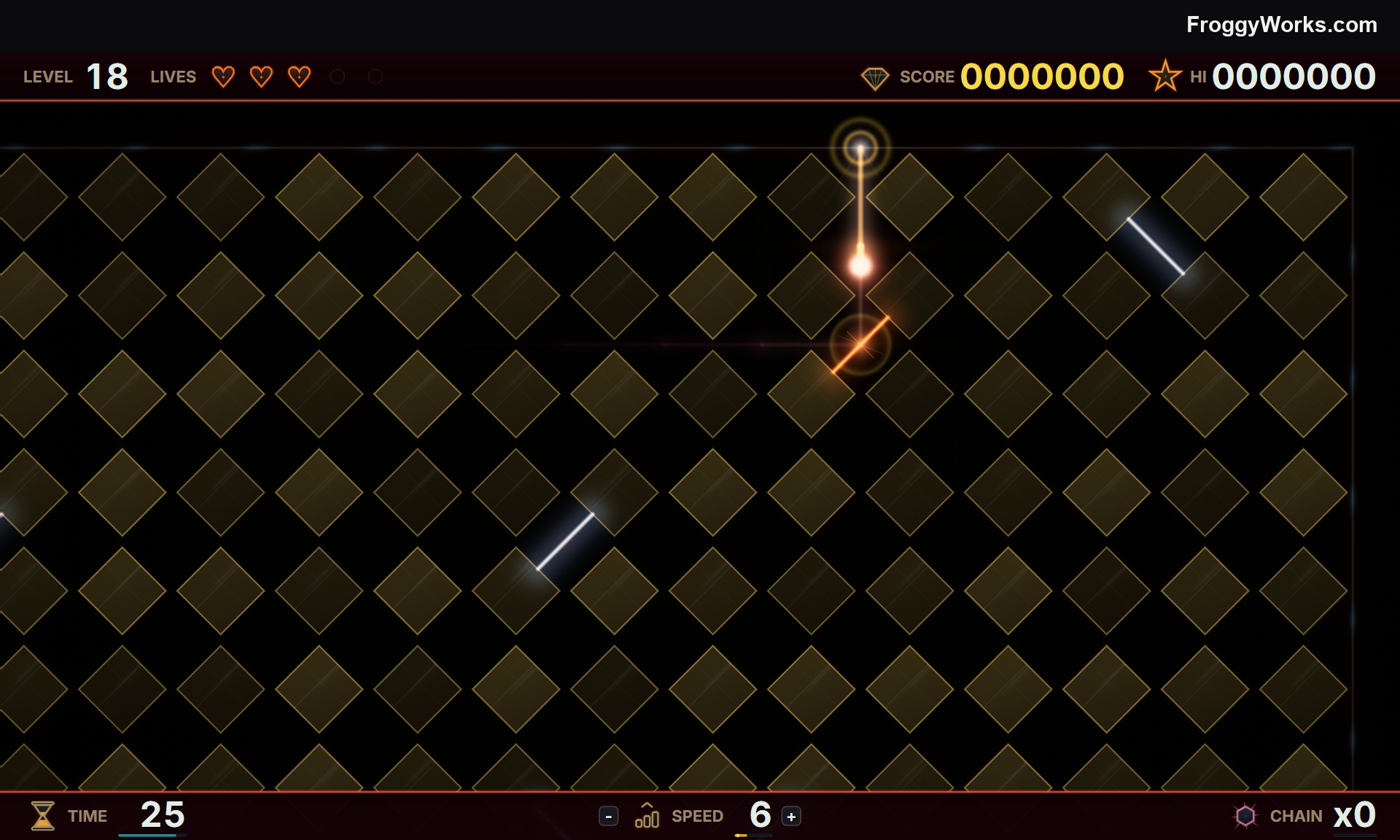
The gold spark follows the switch network but cannot hurt the player. The board becomes a timed chase instead of a full clear.
Generating boards that can be cleared
The board generator is deterministic. Given the same seed and level. A generated maze still needs a solvability check. Thermal Runaway models reachability as states made from a cell and a travel direction. A normal switch contributes both possible reflected directions because the player may flip it. A particle contributes the straight path used before collection plus both reflected paths it may provide after it becomes a switch. Walls reverse the path, and a one-way diode either passes the spark or sends it back.
This is an optimistic graph. It allows more choices than one exact play sequence can take, which makes it useful for proving that a particle is impossible to reach. If the check finds a stranded particle, the repair pass tries candidate switch positions on reachable cells and keeps one that expands the reachable set without cutting off particles that were already valid. Relocating the particle is the last resort.
The result is still a generated arcade board rather than a hand-authored puzzle with one intended solution. The check only prevents the generator from dealing a board that cannot be completed.
It is out
Froggy Works Demo is out now!
The Froggy Works demo is out now on Steam.
Froggy Works is a desktop companion farming strategy game. You start with a frog, a small patch of land, a few seeds, and enough money to begin. From there you plant crops, manage water and fuel, build machinery, hire more frogs, raise chickens, and turn the island into a farm that can keep running without constant attention.
You can play directly, leave the frogs on Auto-Pilot, dock the game along an edge of the desktop, or keep a small picture-in-picture view open while doing something else. Online farms use a short farm code, so friends can join without setting up a separate server.
The demo is available from the Steam page now. The full game is currently scheduled for July 30, 2026.
Download the Froggy Works demo and wishlist the full game on Steam
The demo uses the first farm map and keeps later maps, three later frog characters, corn, and pumpkins for the full game. The normal simulation, Auto-Pilot, desktop modes, and online farm hosting remain active. Demo players can also join retail players, so this is a useful test of how the game actually plays rather than a separate scripted introduction.
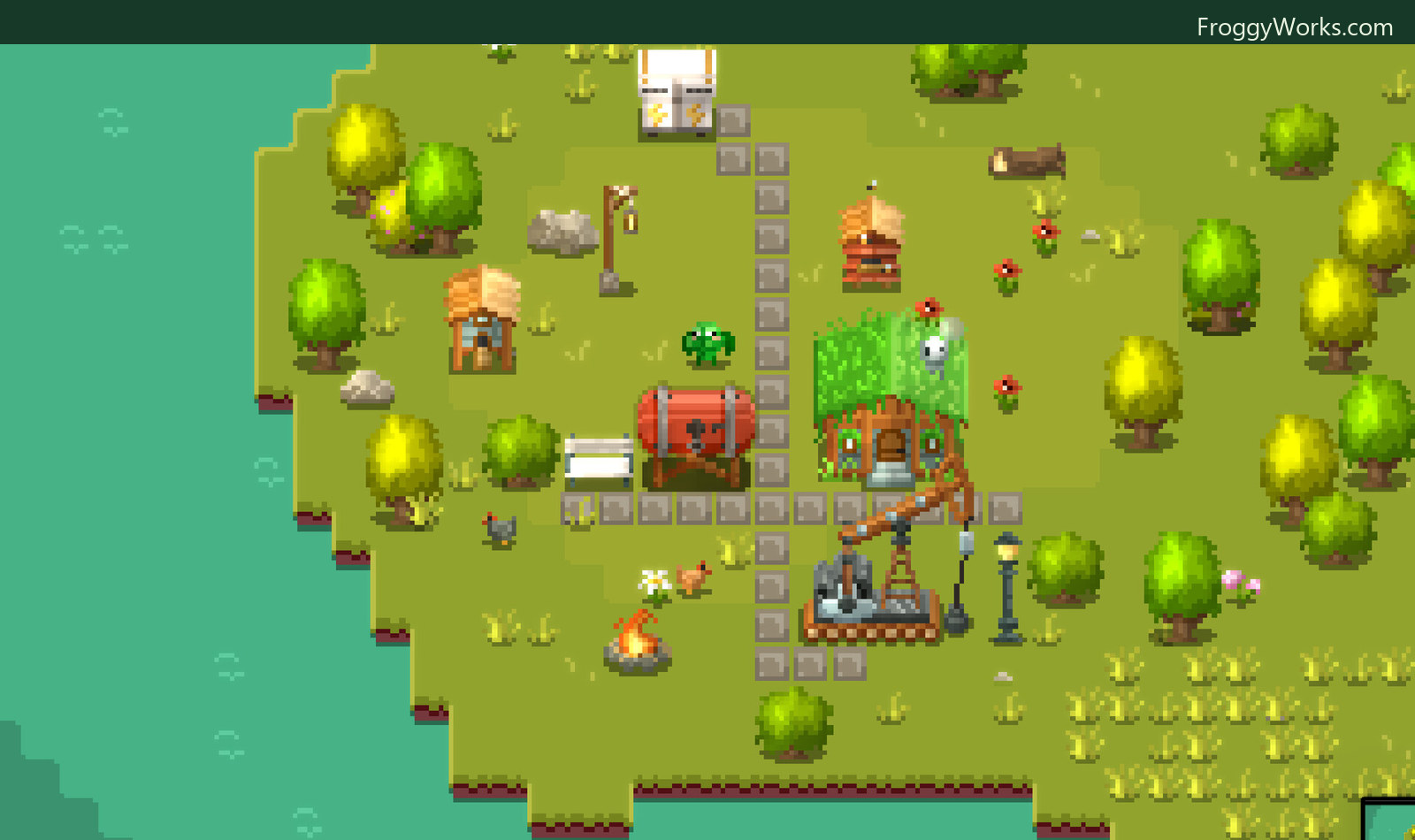
The farm starts small, but it can grow into a network of paths, homes, crop plots, storage, power, water, and production buildings.
A farming game that can run beside your work
I wanted Froggy Works to work in two different ways. It should be a proper little strategy game when it has your attention, but it should also be comfortable living at the side of the desktop.
The active game is about deciding what to build and when. Crops need planting, watering, and harvesting. Markets turn harvest into money. Wells and tanks handle water. Windmills, solar panels, and generators supply power. Other buildings consume fuel, store resources, or automate parts of the farm. Weather and time of day change the conditions around all of that.
The same farm can then be put into a narrow dock or a picture-in-picture window. On Windows and macOS, these are native window modes rather than a video feed from another process. The shared renderer draws the live world again for the PiP surface, centers it on the active frog, applies the current weather and CRT settings, and then restores the main camera state. Windows presents that through a second D3D11 swap chain. macOS uses a Metal-backed panel. Neither path needs to read every frame back through the CPU.
There is also a mouse companion. The small frog overlay uses a transparent, click-through native window, but its behavior is shared in C++. It follows the pointer, selects animations from the same tile definitions used by the game, and can track the active farmer's real state. If the frog is watering, planting, harvesting, or building, the companion can use that activity instead of playing an unrelated canned animation.
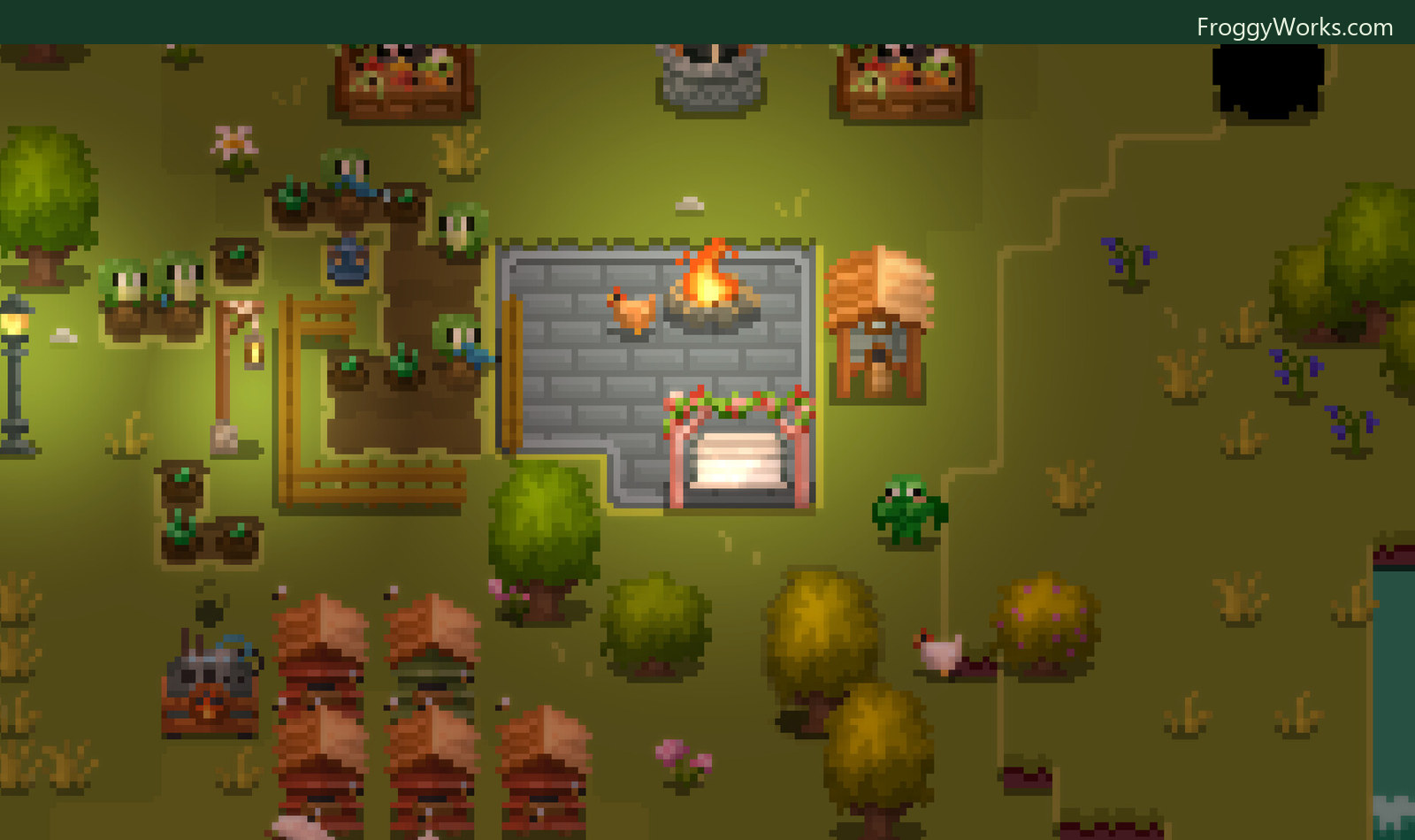
The same world continues through the day and night cycle. Lights, fire, crops, animals, and working frogs remain part of the live simulation.
What Auto-Pilot actually does
Auto-Pilot is not a fixed script that runs through a list of chores. Every autonomous frog has a UnitBrain. A world-level SuperBrain first assigns useful roles such as generalist, farmer, builder, or emergency harvester. The individual brains then evaluate the work that is currently possible and create an objective for the best job.
Each frog reevaluates the available work every 0.12 seconds. Candidate jobs include harvesting, watering, planting, plowing, clearing dead crops, finishing construction sites, and placing structures. The score considers urgency, distance, the frog's role, and what other frogs are already doing. A nearly dead crop is treated differently from a healthy one. A farm without a well or market creates a different priority than one with both systems established.
Coordination happens through a shared TaskBoard. Frogs claim entities and map cells before committing to work, which stops several workers from choosing the same plant or trying to plow the same square. They also leave short-lived spatial penalties behind them. That makes nearby jobs less attractive to the next frog and helps the crew spread across the farm instead of forming a queue around one corner.
The objectives are state machines rather than instant actions. A frog validates the target, finds a route, walks there, issues the normal game command, waits for the action to finish, and releases its claim. If the target disappears or becomes invalid, the objective fails cleanly and the brain can choose something else. A builder can even suspend a construction job when several crops are in danger, harvest them, and then return to the build.
The important part is that Auto-Pilot uses the same command and simulation boundaries as manual play. It does not edit the farm from outside the rules just because the player is not holding the controls.
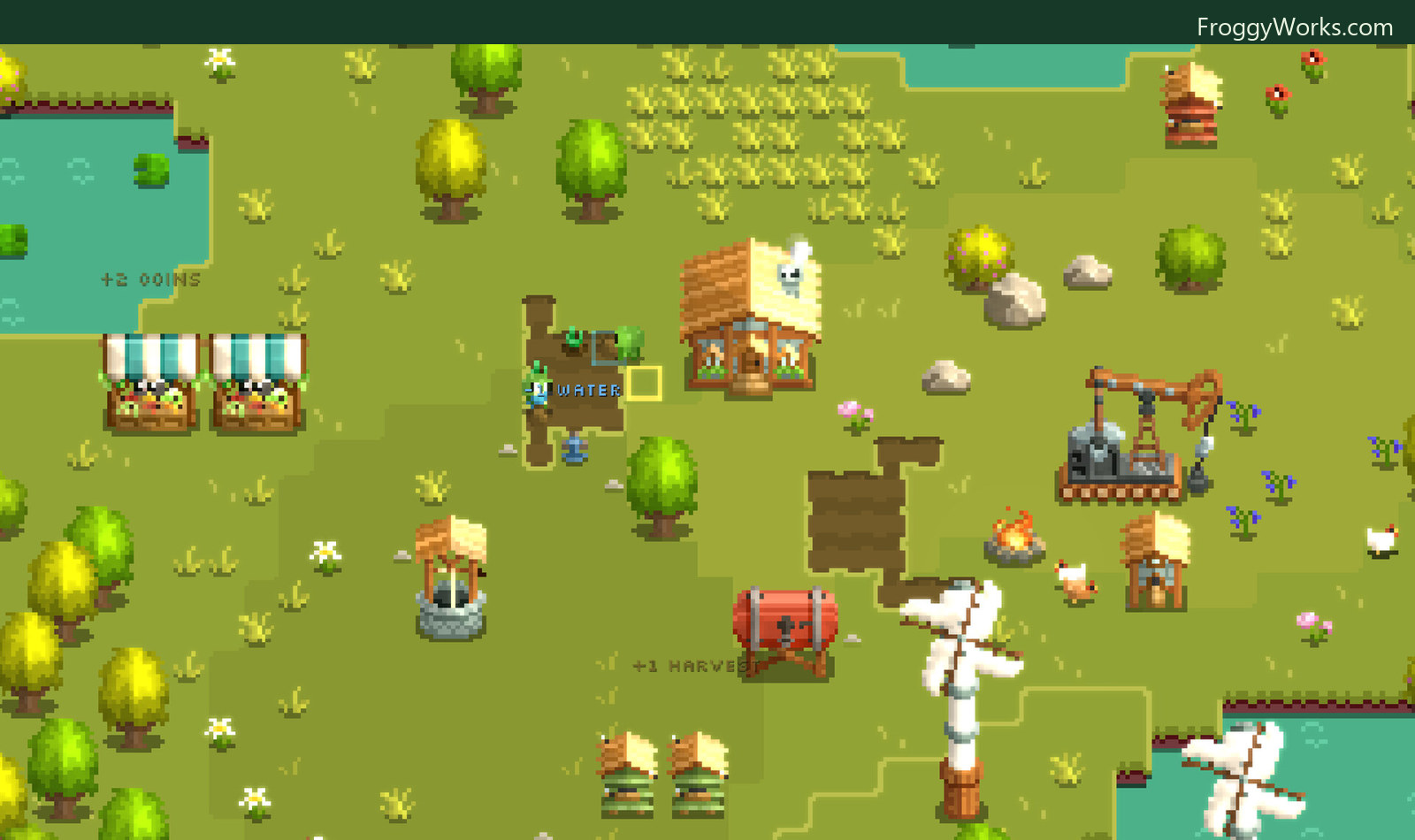
Water, harvest, fuel, coins, and power are connected systems. Auto-Pilot works through the same actions a player uses to keep them moving.
One simulation across the different versions
The current game client is built around a shared C11 and C++20 implementation. The portable C core owns the simulation, commands, saves, pathfinding, AI, and data model. The C++ engine layer owns the application, retained UI, and rendering orchestration. Thin platform shells adapt that work to Win32 and D3D11 on Windows, AppKit and Metal on macOS, and WebAssembly in the browser build.
Game content is data-driven. Human-authored .fwk files describe objects, resources, units, structures, menus, toolbar items, and visual definitions. Compressed level files hold the maps, while generated sprite, weather, and normal-map atlases supply the renderer. The runtime loads those definitions into the same registry used by the simulation and presentation layers.
This separation matters for the demo. It is not a second simplified farming engine made for the store page. It uses the same world rules, AI, commands, renderer, and desktop integration as the full game, with the demo build policy applied around that shared implementation.
Multiplayer follows the same principle. Each participant runs a complete local world, while WebRTC carries player commands and compact owned-unit state. The cloud handles session membership, signaling, farm codes, coordinator election, and recovery checkpoints rather than rendering or ticking every farm. I wrote about that architecture in more detail in How Multiplayer Works in Froggy Works.
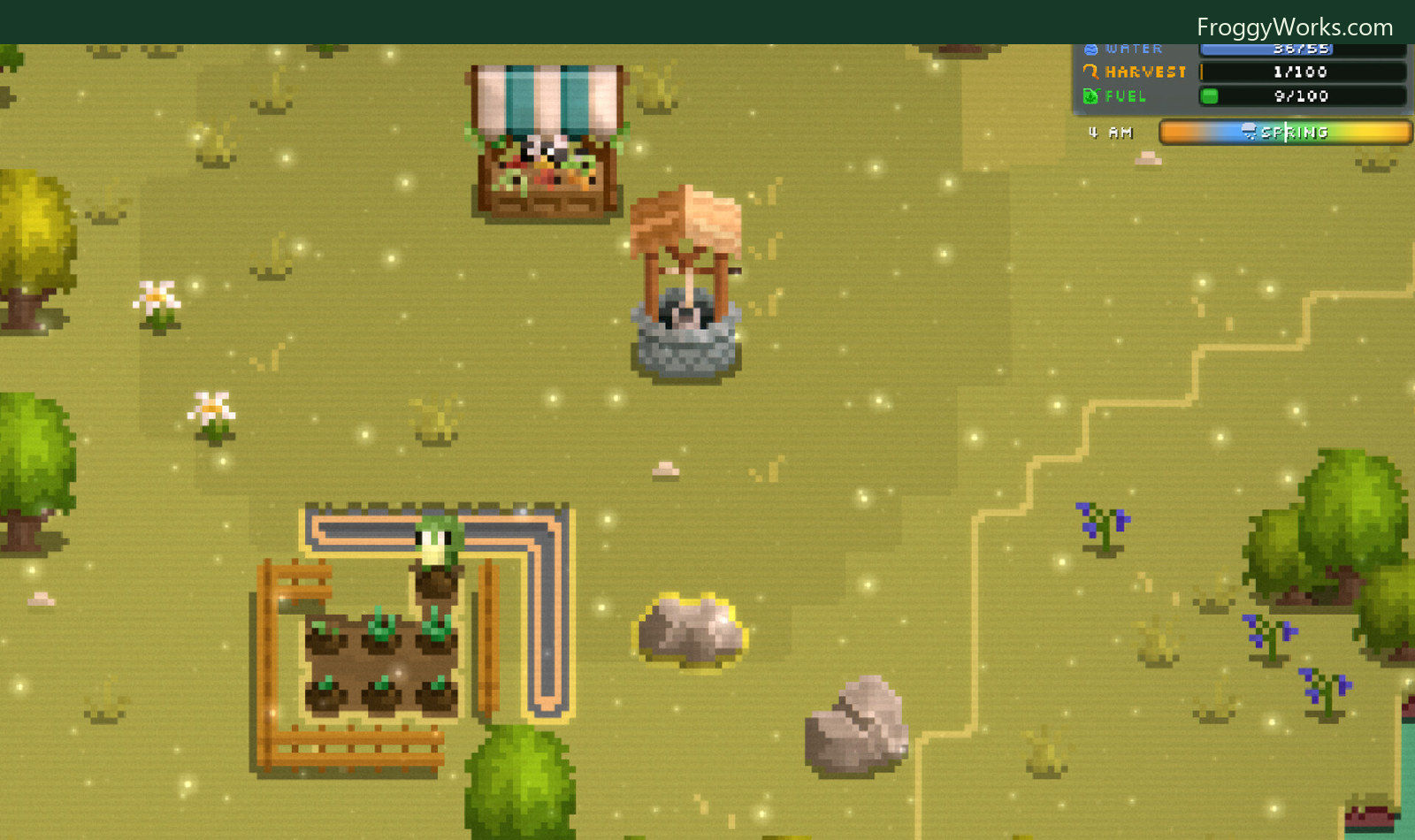
Even a small farm already has several constraints to watch. The resource panel keeps the current water, harvest, fuel, time, and season visible while the world continues underneath it.
Try the demo
The demo is live now. If the idea of a farm that can be played directly, automated, docked beside another window, or shared with friends sounds useful, you can try it from Steam.
The full game is scheduled for July 30, 2026. Wishlisting it helps, and it also keeps the release visible in your Steam account.
Play the Froggy Works demo and add the game to your Steam wishlist
SYSCALL: RING ZERO is out!
SYSCALL: RING ZERO is out now on Steam for Windows and macOS.
This is a game about reading small programs carefully. You dial into a private 1990s BBS, open a job from the network map, inspect the code in front of you, and work out what will make it accept. Sometimes that means recovering an input. Sometimes it means replacing a broken instruction, routing values through a rack of tiny processors, or writing firmware until a waveform matches the trace on an oscilloscope.
The full game has more than 200 authored puzzles across four modes: CRACK, PATCH, WORM, and SCOPE. It is fully offline. There are no accounts or servers. The programs and machines are part of the game, and the same code shown on screen is used when the player presses VERIFY.
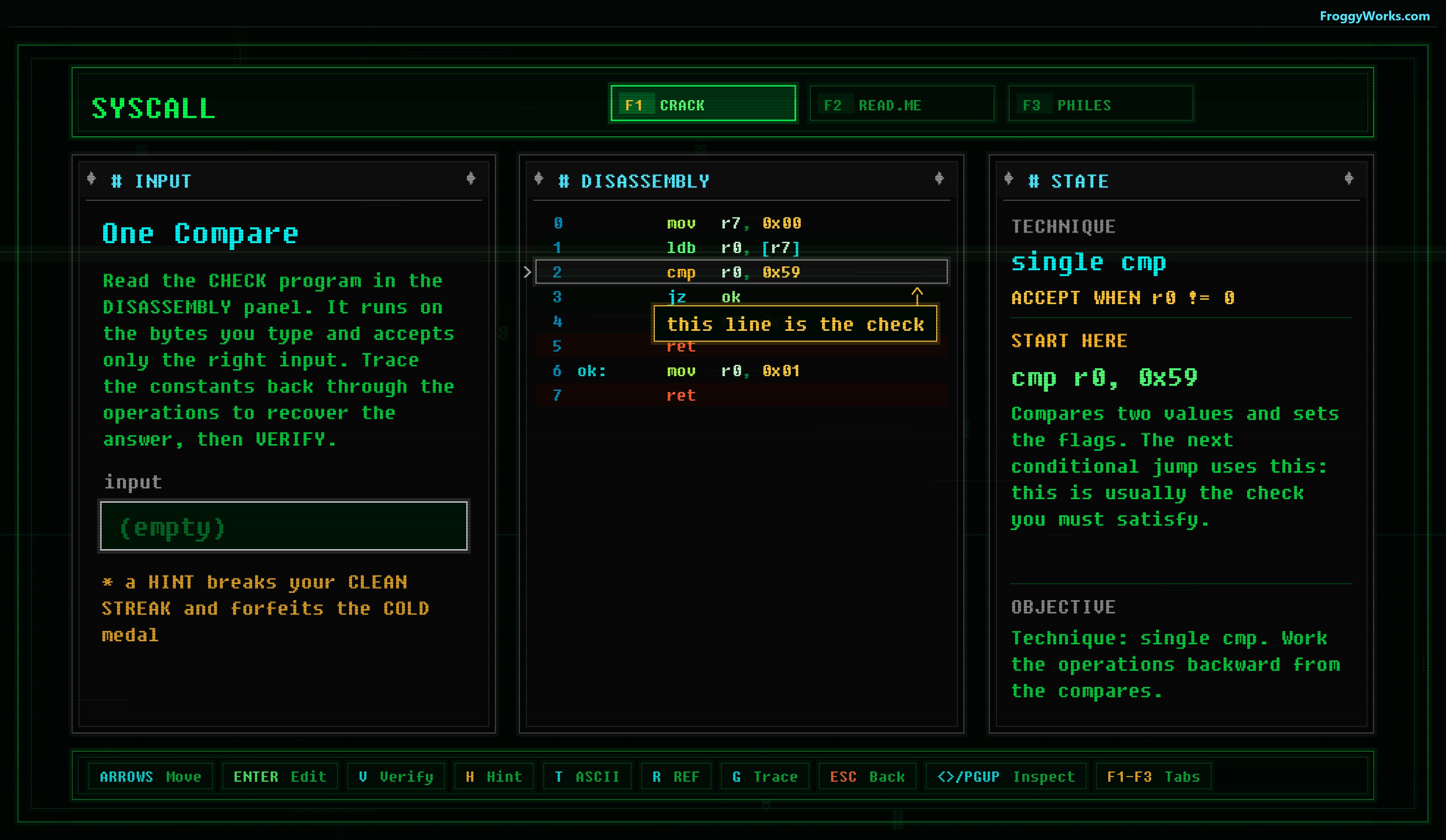
CRACK starts with a small listing and a visible acceptance condition. The highlighted line is not decoration. It is part of the program that runs.
What the game became
The first version of the project was much narrower. It started as a Windows reverse-engineering puzzle built around reading disassembly and finding the check. That basic loop was already the part I cared about: inspect a short routine, form a theory, enter an answer, and see the actual routine decide whether it is correct.
The presentation around that loop grew into a private board. The BBS was useful because it gave every system a natural place. Puzzles became posted releases and tickets. Reference material became PHILES. Progress appeared as access levels, records, and new nodes on the map. Mail could introduce mechanics and carry a small story without stopping the player for long scenes.
The game also moved away from depending on a real processor instruction set. I built the SYSCALL CORE instead: a compact fantasy CPU with eight byte-sized registers, a small readable instruction set, and a clear contract. The registers are r0 through r7, writes wrap at 255, and r0 carries the final verdict. That let me design listings for puzzle readability rather than for the accidents of one real architecture.
From there, the project expanded in layers. PATCH turned the same listings into constrained code surgery. WORM added a 3 by 3 rack of processors and message-passing programs. SCOPE reused the CPU for timing-sensitive firmware and signal matching. The network map eventually became the single front door for all of them, rather than presenting four unrelated game modes on a menu.
A Windows demo was ready by June 19. The full Steam release followed on July 3, 2026. I kept working on the SCOPE bench and controller navigation after release, particularly the waveform layout, cursor inspection, and gamepad camera controls. The current game is the result of that short, concentrated sequence of changes rather than a large framework designed before the puzzles existed.
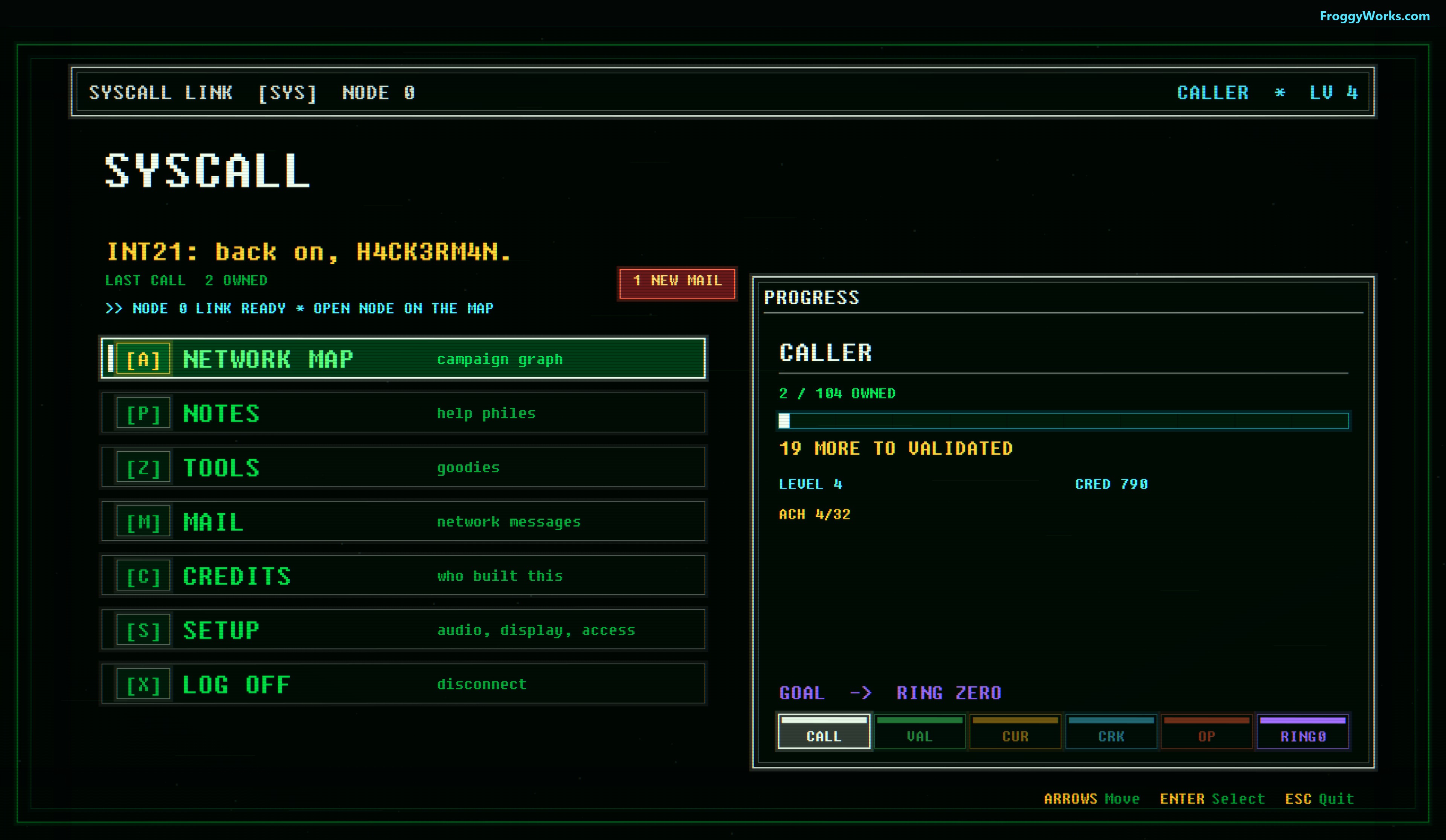
The board is the hub. The network map contains every puzzle mode, while notes, tools, mail, setup, and progress stay part of the same machine.
Four different ways to solve a machine
CRACK is the on-ramp. Each release contains a small SYSCALL CORE program. The player reads the listing, traces constants and branches, then enters the value that satisfies its final check. Early releases teach direct comparisons and simple arithmetic. Later ones move into checksums, rotations, serial formats, table walks, state, and small key generators.
PATCH uses the same general language but changes the question. The input is not the problem. The routine is broken or trapped, and only marked slots may be changed. A solution has to pass the test battery, then the DROP BOARD records how many moves it took. It is deliberately constrained because the interesting part is deciding which operation changes the control flow with the smallest edit.
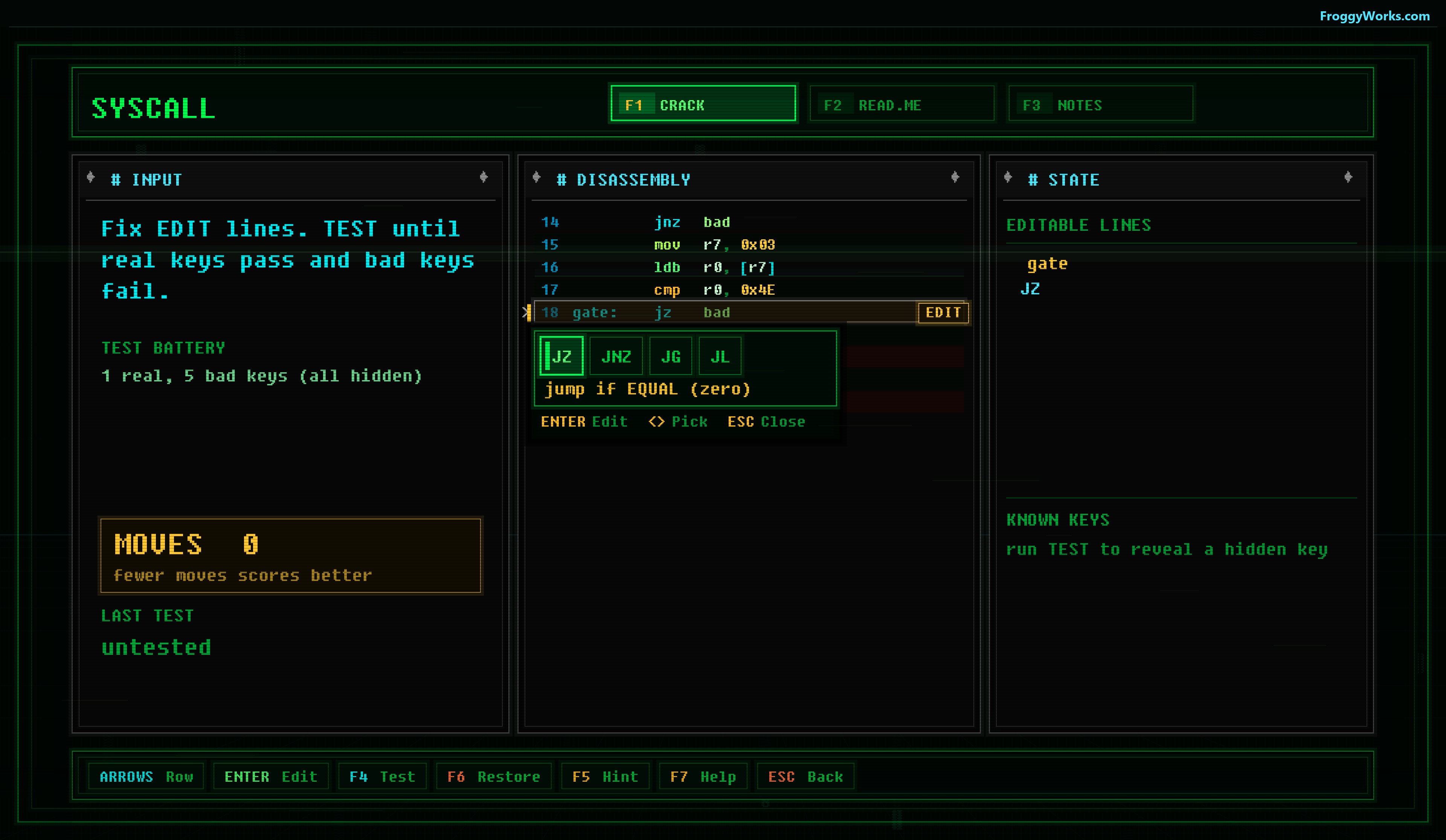
PATCH keeps the listing visible, limits where edits can be made, and scores the size of the repair.
WORM is a different kind of programming puzzle. Nine line cores sit in a 3 by 3 rack. Each has an accumulator, a backup register, a LAST port, and a program of no more than ten lines. Values enter through input rails, move between neighboring cores, and leave through output rails. A correct solution is only the beginning. The records screen keeps the pressure on lines, active cores, and cycle count.
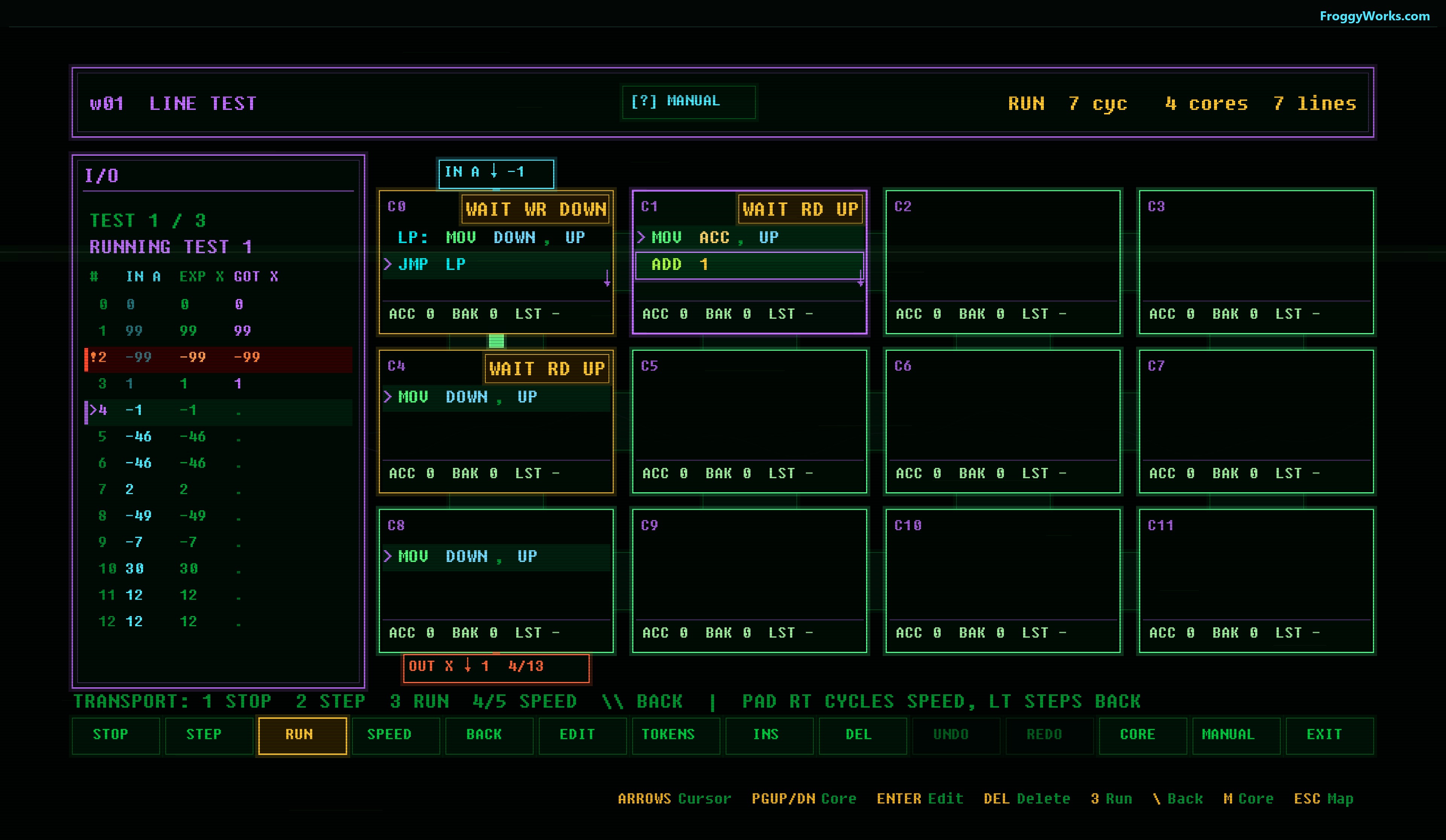
WORM exposes the machine while it runs. A blocked transfer is visible as a WAIT state, and every live core advances under the same cycle model.
SCOPE asks for firmware rather than an answer. The program drives an 8-bit DAC, and slp advances scope time. The target is the dim green ghost trace. A solution locks only when the live output matches that visible reference at every tick. The mode begins with simple levels and ramps, then builds toward counters, timing patterns, and shaped signals.
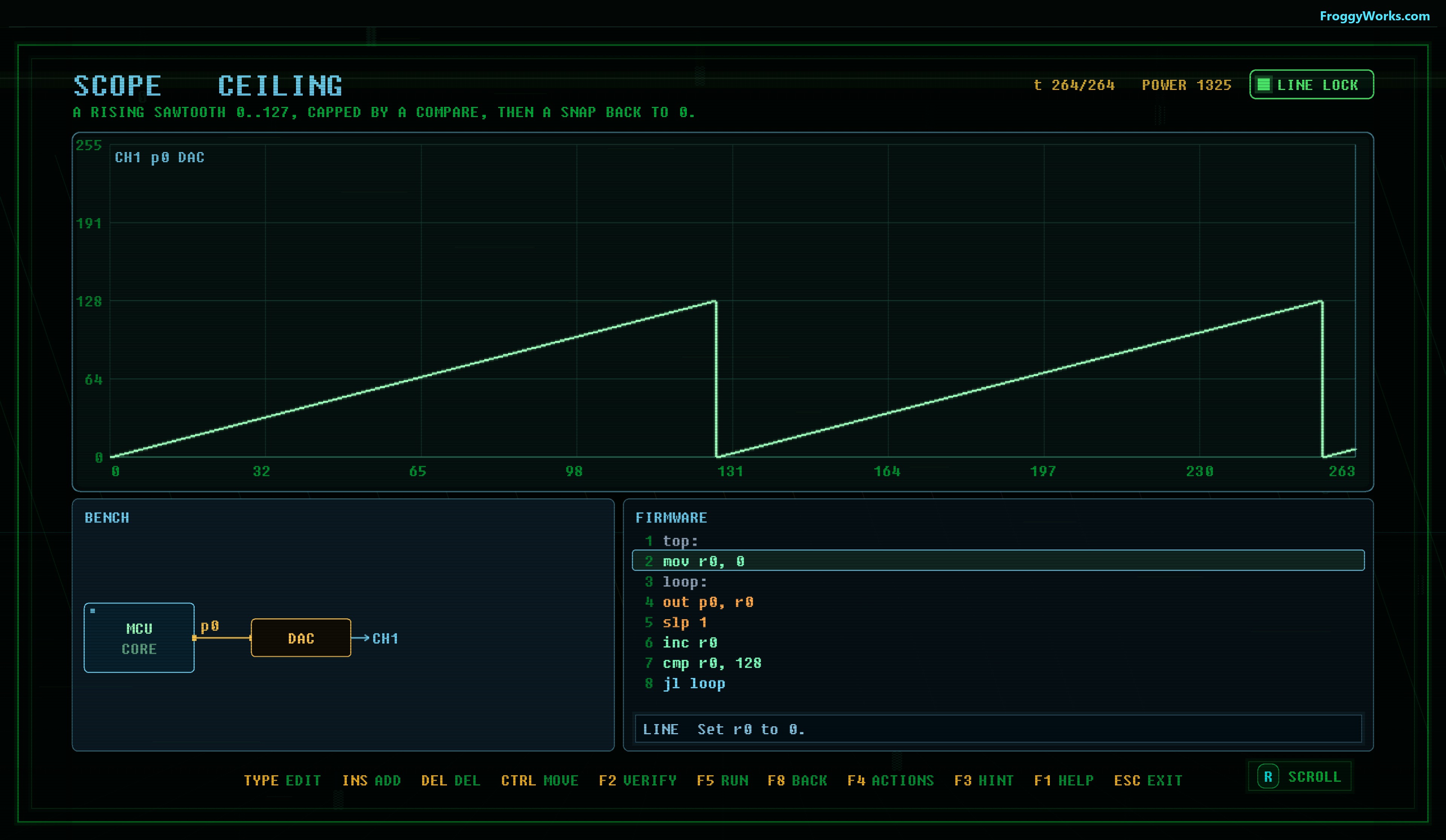
SCOPE runs the player's firmware and the reference firmware through the same simulator, then compares the visible trace tick by tick.
The listing really runs
The most important technical rule in SYSCALL is that the code on the screen must be the code that gets judged.
A CRACK challenge is stored as metadata plus a SYSCALL CORE assembly file. When the game loads the challenge, it parses that assembly into a cpu_program. The disassembly panel reads from that program. When the player presses VERIFY, App::VerifyInput() passes the typed bytes and the loaded program to cpu_check().
cpu_check() resets a cpu_machine, copies in the player input, and runs instructions until the program returns, reaches its end, faults, or crosses the cycle ceiling. The final acceptance rule is applied to r0, but only a clean return or end may pass. An infinite loop or bad instruction cannot accidentally succeed because it happened to leave a nonzero byte in the verdict register.
TRACE uses the same cpu_step() function one instruction at a time while recording snapshots of the program counter, registers, and flags. It is not a second explanatory model layered over the answer. The stepping view and the final verifier share the same machine.
That shared execution path made the teaching side of the game much easier to trust. A note can explain a compare or jump, the player can inspect it in TRACE, and VERIFY reaches the verdict by executing those exact operations.
Making WORM deterministic
WORM has a different problem. If nine processors are simulated one after another, the order of the loop can change the result. Core 0 might write a value before core 1 gets its turn, while a reversed iteration order could make core 1 wait for another cycle. That would make the rack depend on an implementation detail rather than on the programs the player wrote.
The WORM simulator therefore splits each cycle into two phases.
First, every live core computes an intent from its current state. Reads, writes, arithmetic, jumps, and port choices are resolved without mutating the machine. Port-to-port moves can block until both neighboring instructions agree on a transfer. ANY and LAST have stable polling rules so that ambiguous choices still produce the same result every time.
After the handshakes are resolved, the commit phase applies all completed instructions together. Input positions advance, output values are written, accumulators change, program counters move, and blocked cores retain a reason that the interface can show as a WAIT badge.
This is what allows the visual rack, the single-step controls, the record calculation, and the headless content verifier to agree. A ticket is judged against the same cycle model whether it is being watched in the game or checked during the build.
SCOPE compares what the player can see
SCOPE shares the SYSCALL CORE CPU, but it adds a clocked environment around it. The simulator runs instructions until the firmware yields with slp or wait, applies pending pin changes, advances the scope tick, and samples the channels.
For verification, the player's program and the board's reference firmware are run through the same scope_run() path. The judge compares every visible channel at every visible tick. If the traces differ, it records the first channel, tick, expected value, and actual value. If the reference itself stalls, the board is treated as broken instead of blaming the player.
I made the visible waveform the complete contract. A board does not fail on a hidden test case that the player could never inspect. If the live trace matches the ghost across the displayed window, the line locks.
That rule sounds small, but it affected the whole mode. The renderer, probe cursor, error messages, authoring checks, and scoring all had to describe the same time domain.
Shipping the content as one unit
The project has hundreds of small text assets: challenge metadata, assembly listings, WORM solutions, SCOPE boards, and reference firmware. Loose files are convenient during development, but they are fragile in a retail package.
The release build collects them into challenges.pak. It is a compact little-endian archive with a CPAK header and a table of bare filenames and byte payloads. Windows embeds that pack as a resource in the executable. The Apple builds place the same pack in the application resources. The runtime loads it through a small platform resource interface and indexes it in memory.
CRACK, PATCH, WORM, and SCOPE all ask the same content layer for files. Development builds can fall back to the source tree, but the shipped game does not depend on a working directory full of puzzle folders. A smoke test also checks the expected counts by extension and looks for representative files before packaging.
Keeping the BBS readable on different screens
The game draws into a fixed 16:9 virtual canvas. On Windows, the active renderer uses Direct2D over a Direct3D device. The whole scene is rendered to an offscreen bitmap first. A uniform scale then fits that canvas to the actual window without stretching it. A 16:10 Steam Deck display gets letterboxing rather than distorted text and panels.
The second pass applies the CRT chain: curve, chromatic separation, glow, scanlines, brightness, and the final composite. Reduced motion and CRT settings can remove the more aggressive movement and distortion. Static decorative layers are cached, and the heavier demoscene backdrop freezes after an idle interval so it does not keep spending GPU time while nothing is changing.
The macOS version keeps most of the game drawing code intact through a compatibility layer that maps the Direct2D-shaped interface onto Core Graphics and Metal resources. Input follows the same split. Windows uses XInput, while the Apple shell supplies the platform controller events. The game logic and puzzle simulators remain portable C.
This separation also made the screenshot and trailer pipeline practical. The renderer can run headless, draw the normal scene into its offscreen target, and save that target without opening a window. The store screenshots in this post came from the same game rendering path.
It is out
SYSCALL: RING ZERO launched on Steam on July 3, 2026. It includes more than 200 authored puzzles across CRACK, PATCH, WORM, and SCOPE, along with the BBS, PHILES, mail, records, achievements, controller support, CANVAS, and the four-channel TRACKER.
The game is available here:
I wanted to make a puzzle game where reading the machine is the game. The listing, trace, rack, and waveform are not set dressing around a hidden answer. They are the systems that decide it.
How Lockstep Multiplayer Works in Generals64
Generals64 keeps the multiplayer model used by Command & Conquer: Generals and Zero Hour: every player runs the full simulation, and the network distributes commands rather than world state.
There is no authoritative server sending unit positions, projectile states, or economy snapshots to clients. If I order five tanks to move, the network sends the order. Every machine then executes that order on the same logic frame and independently reaches the same result.
That sounds simple, but it gives the networking code a strict job. It must make sure every player has the same commands, executes them in the same order, uses the same random state, and does not advance until everyone is ready.
That is lockstep.
Commands replace state replication
A modern action game commonly sends snapshots and corrects clients when their local state drifts. Generals64 does almost the opposite. The synchronized unit is a GameMessage.
Commands generated by the UI enter the message stream. The network recognizes messages in the network range, wraps each one in a NetGameCommandMsg, assigns the local player and a unique command ID, and schedules it for a future logic frame:
Int Network::getExecutionFrame() {
    Int logicFrame = TheGameLogic->getFrame() + m_runAhead;
    if (logicFrame > m_lastExecutionFrame)
        m_lastExecutionFrame = logicFrame;
    return m_lastExecutionFrame;
}
The run-ahead is intentional input delay. If the simulation is on frame 1,000 and the run-ahead is four, a new order is assigned to frame 1,004. That gives the command time to reach every other machine before any of them needs to execute it.
sendLocalGameMessage() fills in the rest of the envelope:
NetCommandMsg *netmsg = newInstance(NetGameCommandMsg)(msg);
netmsg->setExecutionFrame(frame);
netmsg->setPlayerID(m_localSlot);
netmsg->setID(currentID);
sendLocalCommand(netmsg);
The receiving side stores commands by player and execution frame. It does not execute them as they arrive. Network arrival order is irrelevant.
A frame is complete when the counts match
The useful part of this protocol is how a peer knows it has received everything for a frame.
At the point where a local frame can no longer accept new commands, each player sends a NetFrameCommandMsg. It contains the frame number and the number of commands that player submitted for it:
UnsignedShort count = m_frameData[m_localSlot]->getCommandCount(frame);

NetFrameCommandMsg *msg = newInstance(NetFrameCommandMsg);
msg->setExecutionFrame(frame);
msg->setCommandCount(count);
msg->setPlayerID(m_localSlot);
This message means, in effect, “I am finished with frame N, and you should have K commands from me.”
Each peer keeps a FrameDataManager for every human slot. A frame is ready for one player only when the declared count equals the number actually received:
if (m_frameCommandCount == m_commandCount)
    return FRAMEDATA_READY;

if (m_commandCount > m_frameCommandCount)
    return FRAMEDATA_RESEND;

return FRAMEDATA_NOTREADY;
The game checks this for every active player. If any one of them is not ready, the simulation does not advance. The networking code continues receiving and retransmitting packets while the renderer can keep drawing, but the next logic tick waits.
Once all frame data is present, the network assembles the command list and opens the gate:
if (AllCommandsReady(TheGameLogic->getFrame())) {
    if (timeForNewFrame()) {
        RelayCommandsToCommandList(TheGameLogic->getFrame());
        m_frameDataReady = TRUE;
    }
}
The main game loop advances only when isFrameDataReady() returns true. Generals64 also keeps rendering separate from this lockstep gate and interpolates visual transforms between logic ticks. Network logic can remain fixed and deterministic without making camera movement and unit animation look like they are limited to the network rate.
Every peer must use the same order
Receiving the same set of commands is not enough. Every machine must process that set in the same order.
NetCommandList sorts commands first by network command type, then by player ID, then by the command's sort number, normally its unique command ID. Duplicates are rejected using the originating player and command ID.
That ordering matters whenever two players issue commands that interact during the same logic frame. Arrival timing cannot be allowed to decide which command wins. One peer may receive player 2's order first and another may receive player 0's order first, but both construct the same sorted list before handing it to game logic.
The result is a deterministic transaction for each frame:
UDP, acknowledgements, and the packet router
The normal transport is UDP. Generals64 keeps packets below a conservative payload limit of 1,100 bytes to reduce fragmentation, and each transport packet carries its own CRC and the 0xF00D Generals magic value. There is also a separate LANAPI relay mode that carries the same destination-addressed packets through a TCP relay. That transport choice is independent of the lockstep and client-server simulation topology.
UDP does not provide delivery guarantees, so the connection layer adds them where the game needs them. Game commands, frame information, run-ahead changes, player-leave messages, and several control commands require acknowledgements. A Connection retains those messages after sending and retries them until the matching acknowledgement removes them from the queue.
Multiplayer also has a packet-router role. In the normal peer-to-peer topology, a non-router sends a command to the router with a recipient bitmask. The router adds the command to its own frame data and fans it out to the other players. The router is a traffic coordinator, not an authoritative simulation server.
Generals64 also supports a client-server network topology. In that mode, clients maintain a direct connection only to the host, while still keeping frame data for every human player. The host relays commands between them. The topology changes, but the simulation contract does not: every machine still runs the world and waits for the same lockstep command set.
The two-stage acknowledgement path follows the relay. The first stage confirms that the router received a command. The second confirms that the required recipients received the relayed copies. This lets the original sender retain pending commands if the router disappears halfway through forwarding them.
Recovering missing frame data
Normal packet loss is handled by command retries. There is also a frame-level recovery path.
If a peer receives more commands than the announced count, it clears the inconsistent frame and requests it again. Missing commands normally arrive through the acknowledgement and retry path. Generals64 keeps recent frame data in a ring buffer instead of discarding it immediately, so a peer can resend the stored commands and the corresponding NetFrameCommandMsg for each player.
for (UnsignedInt frame = startingFrame;
     frame < TheGameLogic->getFrame(); ++frame) {
    sendSingleFrameToPlayer(playerID, frame);
}
Keeping recent frames also helps when the packet router leaves. In peer-to-peer mode, the next slot in the shared fallback order becomes router, pending commands are sent again, and peers can exchange recent frame data to catch up. No world snapshot needs to migrate because every surviving machine already owns the world.
Client-server mode is deliberately different. If its server leaves, the match ends because clients do not have the full connection mesh needed for router promotion.
Run-ahead is the latency budget
A lockstep game needs enough lead time for commands to arrive, but every extra frame of lead is added input latency.
The packet router measures round-trip latency and reported simulation throughput. It computes run-ahead from its latency estimate, a configurable slack percentage, and the current logic frame rate:
const Real runAheadSlackScale = 1.0f +
    ((Real)TheGlobalData->m_networkRunAheadSlack / 100.0f);

Int newRunAhead = ceilf(
    getMaximumLatency() * runAheadSlackScale * (Real)minFps);

newRunAhead = clamp<Int>(
    MIN_RUNAHEAD, newRunAhead, MAX_FRAMES_AHEAD / 2);
A run-ahead change is itself a synchronized network command. Everyone applies the new value on the same execution frame. This avoids one client scheduling new orders against a different future-frame window than the others.
There is also a packet-arrival cushion. If commands are arriving too close to their execution frame, the local pacing code temporarily slows the logic rate to let the slow peer recover. This is why lockstep performance is tied to the slowest participant. The simulation can only advance as fast as every participant can produce and receive its frame data.
Determinism starts with the seed
Command lockstep works only if the simulation is deterministic.
The lobby distributes one game seed. At game start, every peer initializes the game random generator from that same value:
InitRandom(m_currentGame->getSeed());
From there, game-visible randomness must come from the synchronized generator in the same call order. The CRC calculation includes the game-logic random seed, so an extra random call on one machine becomes visible as a state mismatch.
The same rule applies to object iteration, AI, scripts, pathfinding, floating-point behavior, and container ordering. A network bug can cause a desync, but ordinary gameplay code can cause one just as easily if it produces a different result from identical input.
This is one of the difficult parts of moving an old deterministic simulation to 64-bit code. Lockstep exposes assumptions that a single-player run may never reveal.
The logic CRC detects divergence
Generals64 regularly walks the simulation and calculates a logic CRC. The input includes objects, the random seed, game logic, terrain, the partition manager, players, AI, scripts, sides, and the cave system.
The result is sent as another synchronized GameMessage. The current default checks every logic frame. Debug builds expose -NetCRCInterval for changing that interval:
m_CRC = getCRC(CRC_RECALC);
GameMessage *msg = newInstance(GameMessage)(
    GameMessage::MSG_LOGIC_CRC);
msg->appendIntegerArgument(m_CRC);
msg->appendBooleanArgument(isPlayback);
GameMessageList *messageList = TheMessageStream;
messageList->appendMessage(msg);
Because CRC messages travel through the same lockstep command path, every peer compares values representing the same simulation point. After processing the frame's command list, the game verifies that it received one CRC from every connected player and that all values match.
std::map<Int, UnsignedInt>::const_iterator crcIt =
    m_cachedCRCs.begin();
Int validatorCRC = crcIt->second;

while (++crcIt != m_cachedCRCs.end()) {
    if (validatorCRC != crcIt->second)
        sawCRCMismatch = TRUE;
}
A mismatch does not repair the world. At that point the simulations have already diverged, and there is no authoritative state to choose as correct. Instead, Generals64 records the failure, opens the mismatch flow, and writes additional diagnostics. The repository also includes a desync simulation harness that injects controlled divergence and checks the logging pipeline.
The packet CRC and logic CRC solve different problems. The packet CRC detects damaged network data. The logic CRC detects two valid command streams producing different worlds.
The tradeoff
Lockstep is a good fit for an RTS because player intent is much smaller than simulation state. A move order may be a few fields, while the result can involve hundreds of units, projectiles, pathfinding decisions, and economy updates. Sending commands saves bandwidth and makes replays natural because a replay is largely the initial state plus the same ordered command stream.
The cost is strict coupling. One slow peer can stall everyone. Input needs enough run-ahead to survive network latency. Every gameplay system must remain deterministic. A desync cannot be corrected by accepting a server snapshot.
Generals64's multiplayer code is therefore less about synchronizing objects and more about protecting a sequence. It schedules commands into future frames, confirms the exact count from every player, sorts them identically, retries lost data, and checks that the resulting worlds still match.
As long as that sequence remains identical, every machine can simulate the battle locally and arrive at the same result without sending the battle itself over the network.
Building Fast Sound Library
I have collected a lot of sound effects and music over the years. Finding the right one should be a quick job: open a folder, type a few letters, listen, and drag the file into whatever I am working on.
In practice, every audio library manager and sampler I tried got in the way somehow. Some were slow with large libraries. Some installed an entire ecosystem when I only wanted to browse sounds. Others wanted an account, a cloud library, or a subscription before they would let me work with files already sitting on my disk.
I got frustrated and made my own. It is called Fast Sound Library, or FSL.
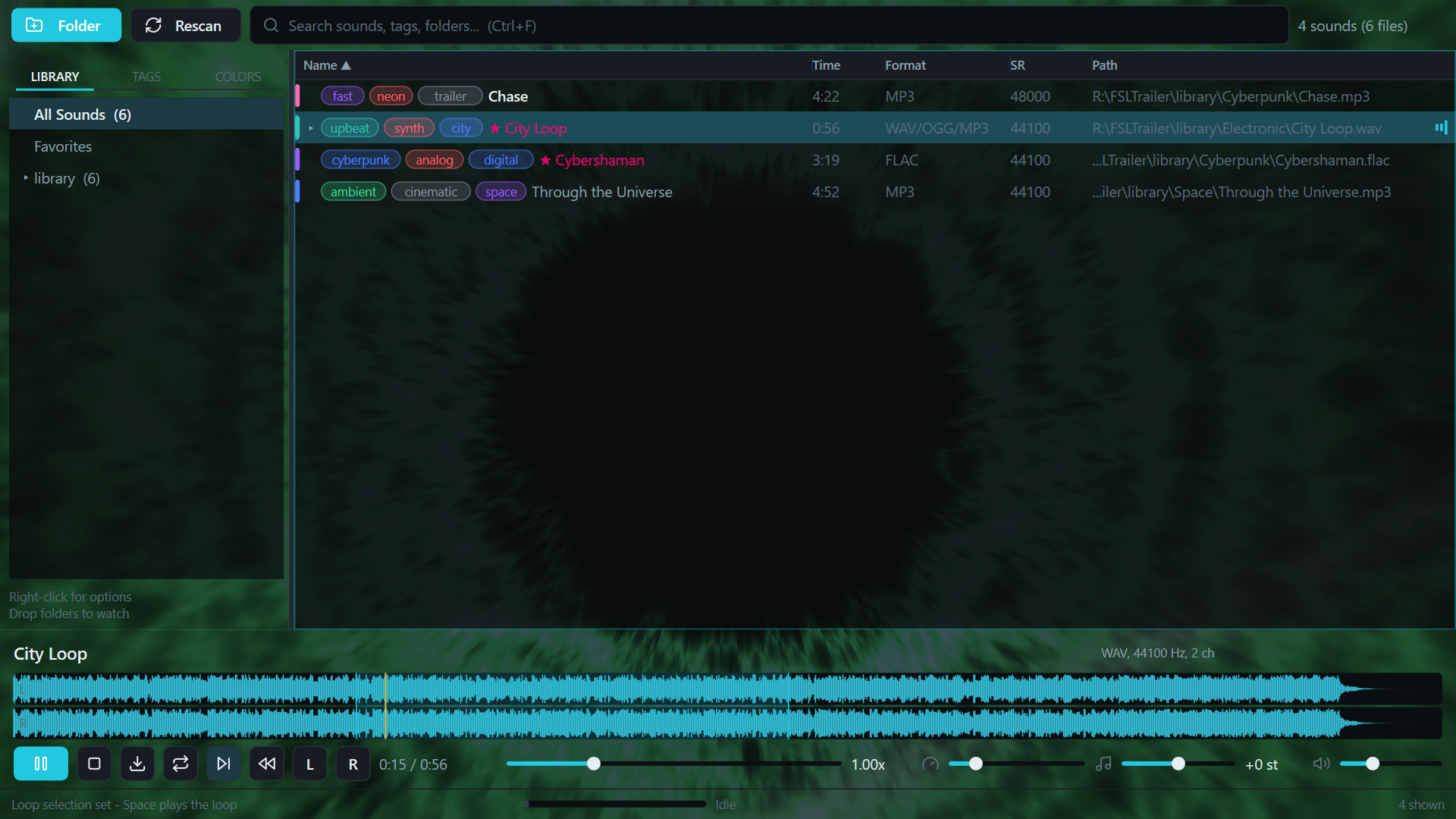
FSL is a native C++ Windows/macOS application built around one workflow: type to search, use the arrow keys to audition results, and drag the sound into a DAW or another application. It also has tags, favorites, waveform scrubbing, loop regions, reverse playback, speed and pitch controls, but those features all have to stay out of the way of browsing.
The main requirement was speed. I did not want an application that merely looked minimal while doing a large amount of work behind the scenes. Startup, search, rendering, decoding, and playback all had to be designed around that requirement.
A hardware-accelerated interface
FSL does not use Electron or a general-purpose cross-platform UI framework. I wrote a small retained-mode UI system on top of Win32, Direct2D and DirectWrite. The renderer creates a D3D11 hardware device and presents through a DXGI flip-model swap chain. The maximum frame latency is set to one, which keeps input and drawing responsive. There is a WARP fallback for machines where a hardware D3D device cannot be created, but the normal path is GPU accelerated.
This is not just used for a decorative visualizer. The complete interface, including the library, waveform, text, SVG icons and controls, is rendered through Direct2D on the D3D11 surface. Some visualizer backgrounds also use HLSL shaders directly.
The UI is retained rather than redrawn as a pile of unrelated immediate-mode calls. Controls form an element tree with measure, arrange and paint passes. Dirty flags determine what needs another layout or paint pass. The library list is virtualized, so a library containing thousands of files still only creates and paints the rows visible on screen.
The DXGI swap chain uses two buffers and flip-sequential presentation. Combined with a 60 Hz transport tick and a one-frame latency limit, it feels like a native tool because it is one.
Loading a library without decoding it
Scanning an audio library and playing an audio file are separate jobs in FSL.
When a folder is added, FSL first enumerates files and filters them by supported extension. It does not decode every file just to put it in the library. The second phase performs a lightweight metadata probe to read the duration, sample rate, channel count and format. Media Foundation handles the normal Windows codecs, and ffprobe can fill in the gaps when FFmpeg is available.
The resulting index is kept in memory and saved as JSON under the user's local application data folder. On the next launch, FSL loads that index directly instead of scanning and decoding the complete library again. Paths and numeric IDs have their own lookup tables, while search uses a prebuilt lowercase search blob and a lazily rebuilt name order. Typing into the search box does one pass over the existing index without sorting the complete result again for every key press.
A full rescan runs away from the UI thread. Directory enumeration stays single threaded so several iterators do not fight over the same disk, then metadata probing is distributed across a small worker pool bounded by the machine's hardware concurrency. Routine saves have their own thread and are debounced, so changing a tag does not perform disk I/O inside an input handler.
FSL also watches library folders with ReadDirectoryChangesW using overlapped I/O. Added, removed, modified and renamed files update the index in the background. This avoids the usual choice between constantly rescanning a library and letting it become stale.
Fast auditioning and broad codec support
The expensive part, a full audio decode, only happens when a sound is selected for playback.
That decode runs on a dedicated worker thread. Audition requests use a generation number, so moving quickly through the list cancels stale work and makes the newest selection win. The UI thread remains free to handle input while Media Foundation or FFmpeg opens the file. Recently decoded sounds are kept in a small LRU-style cache, limited to three entries and 256 MB, which makes moving back and forth between nearby results nearly instant.
Media Foundation is the first decoder for WAV, AIFF, MP3, FLAC, M4A, WMA, OGG and the other formats available through the installed Windows codecs. If it cannot open a file, FSL can fall back to FFmpeg. That adds formats such as APE, Opus, tracker modules, WavPack and quite a few older or less common codecs without making FFmpeg a requirement for ordinary use.
The decoder converts audio to interleaved 32-bit floating point PCM. Files that decode to less than 64 MB stay in memory. Larger previews spill to a temporary file and are memory mapped, so opening a long recording does not require one enormous allocation. A peak envelope for the waveform is generated once when the file loads rather than being recalculated every frame.
Playback goes through XAudio2. The decoded buffer is submitted to a source voice, and XAudio2 handles low-latency playback, seeking, looping and frequency-ratio changes. Loop selections are sent as actual XAudio2 loop points. Speed and pitch use the source voice frequency ratio, which gives FSL its 0.25x to 4x varispeed range without rebuilding the buffer every time a control moves.
The result is the application I wanted in the first place: local, hardware accelerated, quick to open, and quick to audition. There is no account to create, no subscription to maintain, and no attempt to move a sound library into somebody else's cloud. FSL opens the folders I already have and lets me get back to work.
You can try the offline web edition at fastsoundlibrary.com. The native Windows edition is also coming to Steam.
How Multiplayer Works in Froggy Works
Multiplayer in Froggy Works does not use a traditional game server that owns the world and sends the result to everyone else. Every player runs a complete copy of the simulation locally.
The cloud server still has a job, but it is deliberately small. It creates sessions, assigns join codes, relays WebRTC signaling, tracks membership, elects a coordinator, and stores recovery snapshots. It does not run farms or tick game worlds.
This was an important distinction for me. I wanted local input to feel like local input, even when the game was online. Waiting for a server round trip before a frog starts walking would make the controls feel worse for everyone, including the person who created the farm.
A complete world on every device
Each participant owns a local FfServer and FfClient. The server half advances the world, and the client half handles input, prediction, presentation, and rendering. Windows, macOS, and iOS use the native C/C++ implementation. The browser runs the same C core compiled to WebAssembly.
With one player, online play is almost the same as offline play. There is no peer connection to maintain. Commands are applied to the local simulation, and the result is rendered immediately.
When another player joins, WebRTC data channels are opened between the peers. The architecture does not suddenly switch to streaming a host's world. Both players continue running their own worlds. They exchange commands and compact owned-unit state so those worlds converge.
The basic command path is:
The local command router is intentionally ordered this way:
status = ff_core_client_predict_locally(
    client, command, &track_predicted_sequence);

status = ff_server_apply_command_json(local_server, command_wire);
status = ff_core_client_drain_local_server(client);

if (status == FF_OK && client->peer_local_replication != 0) {
    status = ff_core_client_send_command_wire(client, command_wire);
}
The network send comes after the local application. The player does not wait for WebRTC, SignalR, the coordinator, or another simulation tick before seeing the action.
Commands instead of world dumps
Gameplay messages use a small envelope around the normal Froggy Works command format:
{
  "kind": "peer-command",
  "ownerId": "stable-player-id",
  "command": { "$type": "Move", "TargetX": 312, "TargetY": 208 }
}
There are matching peer-join and peer-leave messages. This makes player lifecycle explicit and, importantly, idempotent. Receiving the same join twice does not spawn two characters, and receiving a repeated leave after the character is already gone does nothing.
The command body is the same command system used by local play. Planting, building, harvesting, weather changes, movement, possession, and the rest of the game do not need separate multiplayer versions. Multiplayer is mostly a transport around the existing simulation boundary.
Native clients parse and validate the envelope before touching the world. The coordinator also checks that the ownerId in the message matches the identity assigned to that WebRTC peer:
if (!parsePeerMessage(commandJson, message) ||
    message.kind != PeerMessageKind::Command ||
    message.ownerId != stableOwner ||
    !server.applyPlayerCommand(stableOwner, message.commandJson)) {
    return;
}

transport.broadcastCommand(commandJson);
That check does not make the game cheat-proof. Peer-local multiplayer deliberately trusts the clients, and a modified client can cheat. It does stop a peer from casually putting another player's identity into an otherwise valid packet.
For movement, each player owns the feel of their controlled character and publishes compact position updates at 20 Hz. Other peers apply those updates to their local copy. Most actions are event-like commands, so there is no reason to continuously serialize and transmit the whole farm for normal gameplay.
The coordinator is not a simulation host
One peer is called the coordinator, but the name can be misleading. It is not the only peer running the game, and the guests are not remote renderers.
The coordinator is a stable ordering and relay point. That matters when two players try to claim the same thing at the same time. Possessing another unit is the obvious example. Sitting on furniture has the same problem because a seat can only have one occupant.
Those contested operations take a different route. A guest predicts presentation where appropriate, but does not commit the operation to its local simulation first. It sends the request to the coordinator, which validates and relays the accepted result. Ordinary commands still use the immediate local-first path.
The split is small in the core:
if (command->type == FF_CMD_POSSESS) {
    return true;
}
if (command->type != FF_CMD_USE_STRUCTURE) {
    return false;
}
return def != NULL && def->seats.len > 0;
This avoids turning every action into a network round trip just because a few actions need a single ordering decision.
WebRTC for gameplay, SignalR for introductions
The cloud server uses SignalR on /webrtchub, but gameplay does not travel through that hub. SignalR handles the control plane: session creation, joining, protocol negotiation, SDP offers and answers, ICE candidates, membership changes, and coordinator election.
Once peers have negotiated WebRTC, the game data moves over four named data channels:
createDataChannel("ctl", reliable);
createDataChannel("cmd", reliable);
createDataChannel("snap", reliable);
createDataChannel("pos", unreliableUnordered);
ctl carries welcome and lifecycle data. cmd carries the peer command envelopes and is reliable and ordered. snap and pos remain for compatibility with the older host-mirror path. A current peer-local guest already has a full simulation, so it ignores those legacy streams during normal play.
The server relays signaling only between peers in the same session. It also limits signaling payload sizes and rates before forwarding them. TURN credentials are generated server-side when direct peer connectivity is not possible, so no long-lived provider secret is shipped in the game.
Checkpoints and host migration
Local-first does not mean disposable. The coordinator uploads a full recovery save when the session is created, every 12 seconds, when players join or leave, and during shutdown when possible.
The cloud stores that snapshot with the permanent farm code and membership data. It never simulates the snapshot. Before storage, it removes player characters whose stable identities are no longer connected, so a stale disconnect cannot be resurrected by a later checkpoint.
When the last player leaves, the farm becomes paused rather than deleted. Joining the same code later restores the snapshot into a local simulation, and the returning player becomes the new coordinator.
Migration while people are still connected uses the same idea. The signaling server elects a surviving peer and sends it the latest recovery snapshot. The promoted guest ends its guest stream, loads the snapshot as a recovery fence, installs the coordinator broadcaster, and continues:
activation.migrationSnapshotJson = std::move(snapshotJson);
activation.migration = true;

if (guestActive) {
    guestBridge->endStream();
}

hostBridge->activate(activation, *runtime, &unitEntityId, &error);
roleValue = P2PSessionRole::Host;
Because every peer was already running a complete world, migration is mostly a routing change. The promoted peer is not being upgraded from a passive renderer into a game server.
The tradeoff
This design optimizes for responsive cooperative play, not competitive security. The server cannot fully validate a simulation it never runs. Two clients can also diverge if a command is dropped, interpreted differently, or applied in a different order, which is why the protocol has strict message validation, stable owner identities, coordinator ordering for contested actions, position convergence, and durable recovery snapshots.
The useful result is that online play still feels local. The network carries intent and recovery data, not every frame of the game. The cloud can disappear from the hot gameplay path without disappearing from session management or persistence.
That is the main idea behind Froggy Works multiplayer: run the game everywhere, synchronize the decisions that matter, and keep the server out of the way unless it has a specific job to do.
Roads in C&C Generals
Roads in Command & Conquer: Generals look like part of the terrain, but they are not painted into the height map. They are generated meshes built from pairs of points stored in the map.
That distinction explains most of the system. World Builder records the centerline and road type. At load time, the renderer discovers which segments touch, creates corners and intersections, conforms the result to the terrain, and groups the triangles by texture for drawing.
The other important detail is what roads do not do. A normal road is not a pathfinding graph, it does not create game objects, and I found no road-specific movement-speed rule in the logic code. It is a visual layer over the terrain. Bridges share some authoring and configuration machinery, but they become gameplay objects with damage and pathfinding state.
A road starts as a type and two points
Road styles are defined through the terrain-road INI subsystem. Each TerrainRoadType has a name, texture, road width, and a width value describing how much of the texture belongs to the road surface:
const FieldParse TerrainRoadType::m_terrainRoadFieldParseTable[] =
{
    { "Texture", INI::parseAsciiString, nullptr,
      offsetof(TerrainRoadType, m_texture) },
    { "RoadWidth", INI::parseReal, nullptr,
      offsetof(TerrainRoadType, m_roadWidth) },
    { "RoadWidthInTexture", INI::parseReal, nullptr,
      offsetof(TerrainRoadType, m_roadWidthInTexture) },
    { nullptr, nullptr, nullptr, 0 },
};
The engine loads default definitions from Data\INI\Default\Roads and then the regular override directory at Data\INI\Roads. Every type receives a numeric ID. The ID is important later because it identifies both connectivity and the texture batch.
On the map side, a segment is stored as two consecutive MapObject records. The first has FLAG_ROAD_POINT1; the second has FLAG_ROAD_POINT2. The first point's name identifies the road type. Their positions provide the centerline endpoints.
The flags also carry local authoring choices:
The map format therefore stores very little road geometry. It keeps intent: type, endpoints, and a few corner hints. The runtime reconstructs the rest.
Road records stay on the terrain side
Map objects normally become logic objects such as buildings, props, or units. Roads and endpoint-style bridges are explicitly skipped by that creation loop:
if (pMapObj->getFlag(FLAG_BRIDGE_FLAGS) ||
    pMapObj->getFlag(FLAG_ROAD_FLAGS))
{
    continue; // roads & bridges are special cased in the terrain side.
}
This is more than an implementation detail. A road point has no health, team, AI module, collision module, or per-frame update. Destroying nearby buildings does not destroy the road. Units do not query a road object while moving.
The road builder reads the same global MapObject list directly. It expects each point-one record to be followed by point two, resolves the point-one name through TheTerrainRoads, and creates an internal RoadSegment:
if (pMapObj->getFlag(FLAG_ROAD_POINT1)) {
    MapObject* pMapObj2 = pMapObj->getNext();
    if (!pMapObj2 || !pMapObj2->getFlag(FLAG_ROAD_POINT2))
        continue;

    curRoad.m_pt1.loc = { pMapObj->getLocation()->x,
                          pMapObj->getLocation()->y };
    curRoad.m_pt2.loc = { pMapObj2->getLocation()->x,
                          pMapObj2->getLocation()->y };
}
A zero-length segment is nudged by a quarter world unit rather than passed through as a degenerate line. Duplicate segments are discarded later.
The loader turns loose segments into chains
The geometry build is a fixed pipeline:
RoadMeshOutput RoadBuilder::build()
{
    addMapObjects();
    updateCountsAndFlags();
    insertTeeIntersections();
    insertCurveSegments();
    insertCrossTypeJoins();
    preloadRoadsInVertexAndIndexBuffers();
    return gatherBatches();
}
addMapObjects() first computes the two physical edges of every segment. It subtracts the endpoints to get a direction, rotates that direction by 90 degrees to get a normal, normalizes it, and scales it by half the configured road width:
Vec2 roadVector(loc2.X - loc1.X, loc2.Y - loc1.Y);
Vec2 roadNormal(-roadVector.Y, roadVector.X);
roadNormal.Normalize();
roadNormal *= cur.m_scale * cur.m_widthInTexture / 2.0f;
Those edge points become top and bottom at both ends. From then on, most joins work by moving or intersecting those edges.
The builder compares endpoint coordinates and counts how many same-type segments meet at each point. Connectivity uses exact coordinate equality and the road type's unique ID. Two visually touching segments of different types are not treated as one ordinary chain.
It also reorders and flips segments into connected runs. That makes later curve insertion possible without maintaining a separate graph structure. The data remains an array, but connected pieces become neighbors in that array.
Corners are generated, not authored as meshes
When two compatible segments meet, the road builder chooses between a miter and a curve.
A shallow turn uses a miter. An endpoint marked as angled also forces a miter. The algorithm intersects the two offset edge lines and moves both segments' top and bottom corners to those intersection points. This closes the crack without adding a special mesh.
For a curved corner, the builder shortens the original straight segments and inserts one or more synthetic CURVE segments. The turn is divided into roughly 30-degree pieces. Each inserted piece carries the original road type, width, and either the normal or tight curve radius.
This is why a long road can be authored as a simple polyline while still appearing rounded in game. The curve is not stored in the map. It is recreated from adjacent directions each time the road mesh is built.
Intersections are classified from direction vectors
Three or four segments meeting at the same coordinate take another path. The builder examines normalized direction vectors, dot products, and cross-product signs to classify the junction.
The internal corner types cover:
enum TCorner {
    SEGMENT,
    CURVE,
    TEE,
    FOUR_WAY,
    THREE_WAY_Y,
    THREE_WAY_H,
    THREE_WAY_H_FLIP,
    ALPHA_JOIN,
    NUM_JOINS
};
A three-way junction can become a normal T, a Y, or one of the offset H-shaped variants. The classification is geometric. The code identifies which pair is most nearly opposed, decides which side the third arm occupies, moves the incoming endpoints to the edge of the selected junction patch, and inserts a synthetic intersection segment.
Four-way intersections receive a corresponding four-way patch. The original straight pieces are shortened so that they terminate against the generated center geometry instead of overlapping it.
This approach does have a practical limit. The constants allow up to six links around a road point, and the generator is tuned around ordinary streets rather than an arbitrary planar-road graph. That is enough for Generals maps, where intersections are deliberately authored and visually inspected.
Different road types need an explicit blend
Same-type roads connect automatically. A transition between asphalt, dirt, damaged pavement, or another texture uses FLAG_ROAD_JOIN.
At an eligible open endpoint, insertCrossTypeJoins() looks for a nearby segment of another type. It derives the direction of that road, clips the current road edges against the join line, and inserts an ALPHA_JOIN patch. It also adjusts stacking order so the intended road type draws over the other one.
If no other road is found, the join vector is extended and the patch acts as a fading cap. This avoids the hard rectangular end that a raw textured strip would otherwise show.
The stacking order is maintained per road type. When one type must appear over another, the renderer raises its stacking level and preserves that order while batching. This is a small local solution to texture-layering problems that would otherwise require a general decal compositor.
The mesh follows the height map
After topology is resolved, every straight, curve, tee, and join is tessellated against the height map.
The core function begins with a four-corner patch. It calculates longitudinal and lateral sample counts from the patch dimensions and the terrain grid size. At each sample it asks the height-map adapter for the maximum cell height:
int uCount = int(roadLen / ROAD_MAP_XY_FACTOR) + 1;
int vCount = int(2 * halfHeight / ROAD_MAP_XY_FACTOR) + 1;

float z = m_heightMap->getMaxCellHeight(
    nextColumn.vtx[j].X,
    nextColumn.vtx[j].Y);
nextColumn.vtx[j].Z = z;
The use of the maximum is deliberate. Across each sampled column, the road surface is raised to the highest terrain point under that slice. This keeps a wide road from cutting through a ridge on one edge while following a lower sample on the other.
The generated vertices then receive a small positive height offset. Without it, the road and terrain would occupy nearly the same plane and produce depth flicker.
The tessellator also removes unnecessary middle columns. If the neighboring columns interpolate closely enough to the current height, the current column is marked deleted. Flat stretches therefore use fewer triangles, while terrain changes retain more samples.
Roads are still an overlay. They conform to the existing terrain but do not flatten it. Good-looking roads depend on the map author preparing a sensible terrain profile under the centerline.
Texture coordinates encode a road atlas
The texture mapping is not a generic planar projection. Straight sections, curves, tees, Y intersections, H intersections, four-way patches, and alpha joins use specific normalized regions of the road texture.
For example, the straight segment starts with a vertical offset of 85 / 512, a regular curve uses 255 / 512, and a tight curve uses 425 / 512. The vertex generator projects each point onto the road direction and normal, then converts those distances into U and V coordinates using the road scale.
That arrangement lets one texture contain reusable pieces for the complete road family. The geometry generator chooses the patch; the UV rules choose the corresponding part of the texture.
It also explains why RoadWidthInTexture exists alongside RoadWidth. The physical strip and the useful painted portion of the atlas are related but not necessarily identical. The generator needs both to make edges and intersections line up.
From the original DX8 buffer to the current renderer
The original path is W3DRoadBuffer. It owns road segments, one vertex and index buffer set per road type, visibility flags, textures, and stacking information. When visibility changes, it reloads the visible geometry into the relevant buffers. Drawing walks stacking order and road type, binds the texture and road shader, then issues triangle draws.
The current Generals64 Direct3D 11 path preserves the geometry algorithm but separates it from the old renderer. RoadGeometry.cpp is a self-contained port with no DX8 or WW3D buffer dependencies. It emits RoadMeshOutput, which contains CPU-side vertices and indices grouped into batches.
TerrainRenderer::BuildRoadMesh() converts those vertices to the current Render::Vertex3D format, creates Direct3D 11 vertex and index buffers, and resolves each batch texture. The mesh is built with the terrain rather than regenerated every frame.
Rendering happens after the terrain and before bridges:
terrainRenderer.Render(camera, heightMap);
terrainRenderer.RenderRoads(camera);
terrainRenderer.RenderBridges(camera);
The road pass enables alpha blending so texture edges can fade into the ground. It binds the shroud texture, allowing fog of war to cover roads consistently with terrain, and optionally applies the macro light map. Batches are then drawn in the order produced by the road builder.
This was a useful porting boundary. The difficult part of the road system is the topology and mesh generation, not the graphics API calls. Keeping that algorithm in a renderer-independent module made it possible to replace DX8 buffers with Direct3D 11 resources without redesigning every map.
Roads, bridges, and railroads are different systems
Roads and bridges share TerrainRoadType and the paired-endpoint convention, but they diverge after loading.
A normal road remains terrain-side visual geometry. A bridge definition includes models and textures for pristine, damaged, heavily damaged, and broken states. Bridge loading creates logic-side bridge information and a GenericBridge object, registers a pathfinding layer, and changes that layer when the bridge breaks or is repaired. The current renderer builds the bridge from model pieces and chooses assets from the current damage state.
That is why destroying a bridge can stop units while driving over a road does not invoke any equivalent road state.
Railroads are separate again. Trains use RailroadBehavior and named waypoint paths. The visible track may use road-like artwork, but the locomotive follows waypoint data rather than querying the road mesh.
A small system with a clear boundary
The road system works because the authoring boundary is narrow.
World Builder supplies endpoints, a road type, and corner hints. The loader reconstructs chains. Geometry code creates curves and intersections. The tessellator follows terrain and assigns atlas coordinates. The renderer batches the result as a transparent terrain overlay.
Nothing in that pipeline needs a road to become a simulation object. Pathfinding remains based on terrain, obstacles, and explicit bridge layers. Vehicle AI remains independent. That keeps decorative road networks cheap and deterministic while allowing bridges, which really change movement and combat, to use the heavier gameplay machinery.
The interesting part is how much visual structure comes from so little map data. Two points are enough to describe a segment. Shared endpoints are enough to discover a network. A few vector tests are enough to choose a corner or intersection. The rest is generated once and handed to the renderer.
AI Decision Making in Generals
The AI in Command & Conquer: Generals is not one large planner looking at the map and inventing a strategy. It is a set of cooperating systems with different jobs.
The build list says what the base can contain and where each structure belongs. Team templates describe useful groups of units. Scripts decide when those teams should be produced and what mission they receive. C++ code handles the repeated work of checking money, prerequisites, factories, construction safety, target validity, movement, and weapon use.
That division is the key to understanding the AI. Most of its apparent strategy comes from authored data and scripts. The engine turns those instructions into legal game actions and keeps them running when factories are busy, builders die, targets disappear, or a team is only partly complete.
Four layers of AI
I find it useful to separate the system into four layers.
The global AI update runs pathfinding and then updates every player:
void AI::update(void)
{
    m_pathfinder->processPathfindQueue();
    ThePlayerList->UPDATE();
}
A skirmish computer player receives an AISkirmishPlayer. A scripted campaign computer player normally receives the more general AIPlayer. The skirmish subclass enables automatic unit production, chooses an enemy, installs the faction's skirmish build list, and adds skirmish-specific base behavior.
This distinction matters. Campaign AI is mostly scenario scripting. Skirmish AI has reusable economic and production loops, but it still depends heavily on scripts for strategic timing.
The base is a transformed template
The AI does not freely design a base from scratch. AIData.ini contains a SkirmishBuildList for every faction. Each entry identifies a structure, a position, an angle, whether it should be built automatically, and how many times it may be rebuilt.
A typical entry looks like this:
Structure AmericaCommandCenter
  Location = X:501.22 Y:546.25
  Rebuilds = -1
  Angle = -135.00
  InitiallyBuilt = No
  AutomaticallyBuild = Yes
END
When a match starts, AISkirmishPlayer::newMap() duplicates the correct faction list and transforms it around the player's actual starting position. That gives the AI a planned base layout without hard-coding one layout into each map.
This also explains some familiar behavior. The AI often rebuilds a structure in the same place because the location belongs to a persistent build-list slot. It is restoring the authored plan, not searching the map for a better design.
Scripts can add urgency by marking a missing slot as a priority build. Automatic slots are considered by the normal base loop. Non-automatic slots are skipped unless a script marks one as a priority or a special rule, such as the low-power override, promotes it.
When it constructs a building
Base construction is a guarded polling loop. The current skirmish code checks periodically rather than reconsidering the whole base every frame. Completing a unit or structure shortens the delay so that a changed economy or tech tree is noticed quickly.
When construction is allowed, the AI scans the build list and rejects slots that cannot be acted on. A candidate must be missing, safe, buildable, affordable through the normal construction rules, and have an available builder. The preferred location is checked for path clearance, terrain restrictions, and object overlap. If it is blocked, the skirmish AI searches a large expanding perimeter for a legal replacement point.
The selection order contains several deliberate exceptions:
The power override is particularly direct:
if (powerPlan && powerInfo && !powerPlan->isEquivalentTo(bldgPlan)) {
    if (!powerUnderConstruction) {
        bldgPlan = powerPlan;
        bldgInfo = powerInfo;
    }
}
The final action is not a silent state edit. buildStructureWithDozer() creates the construction job and assigns a real dozer or worker. Normally the builder travels to the site and the ordinary construction state machine advances the structure to completion.
There is one old RTS-style escape hatch. If the chosen builder cannot path to an otherwise accepted site, this implementation teleports the builder to the construction point and continues. The AI therefore prefers legal, reachable placement, but it will not let a pathfinding failure permanently deadlock its base plan.
The AI also checks whether a location is safe before rebuilding there. Its safety query ignores dead units, undetected stealth units, insignificant structures, harvesters, and dozers, then looks for a meaningful enemy within the configured radius. A structure slot near active enemy forces is postponed instead of fed into the construction queue immediately.
Economy changes the cadence
AIData.ini defines “poor” and “wealthy” cash levels, along with rate modifiers for structures and teams. After a successful selection, the next timer is adjusted using those bands. A wealthy AI attempts another team sooner. A poor AI waits longer.
The current data sets the normal team interval to ten seconds, with a 2.0 wealthy modifier and a 0.6 poor modifier. These are not guarantees that a team will begin every ten seconds. They only decide when the next attempt is allowed. The attempt can still fail because a factory is absent, busy, technologically blocked, or short of money.
Supply production has a separate feedback loop. When a supply center finishes, the AI records a desired gatherer count from faction and difficulty data. It counts surviving harvesters assigned to that center and queues replacements while nearby supplies still contain value. This is why the AI can recover workers or trucks without a strategy script naming each replacement.
Difficulty directly changes those target counts. In the current data, higher tiers assign more gatherers per supply center. That gives harder players a larger economic pipeline without changing the core queue algorithm.
The current Generals64 fork also makes Nightmare explicit rather than subtle. It permanently reveals the map for that AI, shortens normal rebuilding to five seconds, and refunds structure cost so legal dozer construction nets to zero. In other words, the normal decision path is still used, but this tier deliberately gives it information, recovery, and economic advantages.
Units are built as teams
The strategic production unit is not an individual tank or infantryman. It is a TeamPrototype.
A prototype describes a composition using minimum and maximum counts, a production priority, a maximum number of simultaneous instances, optional automatic reinforcement, scripts, and a production condition. A team might require a core composition and request extra optional units if there is time and production capacity.
Before a team can be selected, the engine checks all of these conditions:
if (!proto->evaluateProductionCondition())
    return false;

if (proto->countTeamInstances() >=
    proto->getTemplateInfo()->m_maxInstances)
    return false;

if (!isPossibleToBuildTeam(proto, true, needMoney))
    return false;
isPossibleToBuildTeam() verifies that suitable factories exist, that at least one is idle when required, and that the AI has a configurable fraction of the estimated team cost. The default TeamResourcesToStart value is 0.1, so the AI may start organizing a team before it has cash for the full maximum composition. Each actual production order still passes through the factory and economy rules.
Among all valid prototypes, the AI finds the highest production priority. If several have the same priority, it uses the synchronized game-logic random generator to choose one. Before creating a new team, it may reinforce an existing high-priority team that has fallen below its requested composition.
This is a simple but effective policy. Conditions establish context, priority expresses importance, and random selection prevents equal-priority armies from always appearing in the same order.
The priorities can also change during a match. Script actions can increase a prototype's production priority after success or decrease it after failure:
void TeamPrototype::increaseAIPriorityForSuccess() const
{
    m_teamTemplate.m_productionPriority +=
        m_teamTemplate.m_productionPrioritySuccessIncrease;
}
That is authored feedback, not machine learning. The designer decides what counts as success or failure and how much the priority changes.
Work orders connect strategy to factories
After choosing a prototype, the AI expands its composition into WorkOrder records. Required units use the minimum counts. Optional orders cover the distance from each minimum to its maximum.
For every waiting order, the AI first tries to recruit a matching idle unit near the team's home position. If none is available, it finds a compatible production building and queues the unit through ProductionUpdateInterface:
Object *factory = findFactory(order->m_thing, busyOK);
ProductionUpdateInterface *pu =
    factory ? factory->getProductionUpdateInterface() : NULL;

if (pu && pu->queueCreateUnit(order->m_thing,
                              pu->requestUniqueUnitID())) {
    order->m_factoryID = factory->getID();
}
New units are assigned directly to the inactive team. If a factory is destroyed while training a member, the work order notices that its factory ID is no longer valid and can be assigned again.
A team does not have to reach its ideal maximum before acting. If its build time expires after the minimum composition exists, it stops waiting for optional members. If even the minimum cannot be built, the incomplete team is disbanded.
Completed teams move to a ready queue. The engine waits for the members to become idle at their rally point, but it also has a sixty-second escape hatch so a confused member cannot hold the team forever. The team is then marked active.
Scripts decide when the attack begins
The production manager builds forces, but it usually does not invent their mission. Team and player scripts provide the strategic trigger.
Each team prototype can name scripts for creation, idle state, enemy sighting, unit loss, and destruction. When a completed team becomes active, Team::updateState() runs its creation script:
if (m_created) {
    m_created = false;
    if (!pInfo->m_scriptOnCreate.isEmpty())
        TheScriptEngine->runScript(pInfo->m_scriptOnCreate, this);
}
That script can tell the team to attack another team, attack an area, follow an attack waypoint path, hunt, guard, load transports, use a command button, or wait for another condition. The script system also exposes actions for building a named team, requesting a structure, changing production priority, and enabling or disabling production.
This is where most answers to “why did the AI attack now?” live. A script condition became true, a team reached its minimum viable composition, and activation ran an action. The engine does not apply one universal formula such as “attack when army value exceeds 5,000.” Different factions and team templates can have different conditions and different missions.
An idle script can send a surviving team back into action after its first target or waypoint sequence ends. Enemy-sighted and unit-destroyed hooks can redirect behavior. The script layer turns production events and battlefield events into strategic orders.
Choosing an enemy player
Skirmish AI also maintains a current enemy. It rechecks periodically and normally keeps its existing target while that player still has units and a build facility.
When it needs a new enemy, it starts with distance between base centers. It then applies two social adjustments. A crippled opponent is deprioritized so the AI concentrates on a healthier threat. An opponent already targeted by another skirmish AI receives a penalty, reducing dogpiling. An AI that is attacking this player gets a small preference in return.
The result is still a heuristic, but it produces understandable strategic behavior: attack a nearby viable opponent, spread AI players across targets when practical, and slightly favor retaliation.
Choosing a target inside the battle
Once a team has an attack or hunt order, object-level AI takes over. It filters the world before selecting a target. Candidates normally must be living, on the same map layer, hostile, attackable by the unit, and not hidden by stealth. Line of sight, fog, insignificant buildings, and whether buildings may be attacked are controlled by flags and AI data.
Without a custom attack-priority set, the closest valid enemy wins. With one, the engine combines the authored priority with distance:
Int curPriority = info->getPriority(theEnemy->getTemplate());
Real dist = sqrt(ThePartitionManager->getDistanceSquared(
    me, theEnemy, FROM_BOUNDINGSPHERE_2D));
Int modifier = dist /
    TheAI->getAiData()->m_attackPriorityDistanceModifier;
Int modPriority = curPriority - modifier;
if (modPriority < 1)
    modPriority = 1;
A distant high-value target can beat a nearby low-value target, but distance gradually erodes its score. Occupants also matter: if a garrisoned building or vehicle contains a higher-priority unit, the container inherits that higher value during selection.
The attack itself is a state machine. It approaches, chooses a usable weapon, fires, and reacts to movement or loss of the target. When the victim is gone, hunt-style behavior selects another valid victim. When none remains, the state completes and the team's idle script may decide what comes next.
Difficulty can change target coordination. In squad attacks, Easy selects a random member of the victim squad, Normal selects the closest, and Hard or above makes attackers choose the same member. Higher difficulty therefore concentrates fire without requiring a different movement or weapon system.
General powers and superweapons
General powers use the same data-driven approach. Each faction has one or more ordered skill sets in AIData.ini. A skirmish player randomly selects one defined set, then spends available science points on the first entries it is currently capable of purchasing.
Superweapon placement uses a value search rather than firing at the first visible building. The AI samples a coarse grid over the enemy's structure bounds, scores the objects covered by the weapon radius, and then performs a finer search around the best coarse point. Normal destructive powers favor expensive concentrations. Sneak Attack reverses the value of military units and base defenses, so it looks for a valuable but weakly defended insertion point. Cluster mines are handled separately and are placed near an approach to the AI's own base.
What the AI is really doing
The Generals AI is best described as a deterministic production and behavior engine driven by authored plans.
It constructs because a build-list slot is eligible, safe, legal, and currently important. It produces units because a team condition is true and that prototype has the best available priority. It attacks because a team script starts a mission after the team becomes viable. It chooses individual victims by filtering what the unit can perceive and attack, then applying distance and optional target priorities.
There is no single strategic brain. The behavior emerges from the boundary between data and code:
That structure is old-fashioned, but it is practical. Designers can change strategy without rewriting pathfinding or combat code, while programmers can improve construction recovery, target filtering, and state machines without rewriting every faction's plan. It also makes the AI debuggable. When it does something strange, there is usually a specific build-list flag, team condition, script action, timer, or state transition to inspect.
The UI System in Command & Conquer Generals
The interface in Command & Conquer: Generals is not a collection of sprites painted directly by each game screen. It is a retained window system. Menus, buttons, text fields, list boxes, the command bar, and even the rectangular area that contains the radar exist as persistent GameWindow objects with parents, children, state, callbacks, and drawing data.
That design is easy to miss because the source uses the old Westwood vocabulary of WND files, gadgets, system procedures, and window messages. Under those names is a fairly recognizable UI architecture. WND files describe trees. The window manager owns those trees. Gadgets translate low-level input into semantic events. Screen and HUD code reacts to those events by mutating retained state or by appending commands to the game message stream.
I traced this article through the current Generals64 source. The important point is not merely that Generals has a custom GUI toolkit. It is that the front end and the in-game HUD use the same retained machinery, while the HUD adds a second layer that binds those windows to simulation data.
GameWindow is the retained object
Every visible control begins with GameWindow. The class comment is unusually direct:
/** Class definition for a game window. These are the basic elements of the
 * whole windowing system, all windows are GameWindows, as are all GUI controls
 * etc. */
class GameWindow : public MemoryPoolObject
A window keeps its rectangle, parent and child links, sibling order, identifier, status bits, style bits, user data, and instance data. It also carries function pointers for four separate jobs:
typedef void (*GameWinDrawFunc)(GameWindow *, WinInstanceData *);
typedef WindowMsgHandledType (*GameWinInputFunc)(GameWindow *, UnsignedInt,
                                                  WindowMsgData, WindowMsgData);
typedef WindowMsgHandledType (*GameWinSystemFunc)(GameWindow *, UnsignedInt,
                                                   WindowMsgData, WindowMsgData);
There is also a tooltip callback. The split matters. The input function implements the behavior of the control itself. The system function is normally owned by the containing screen or panel. The draw function presents the current retained state.
A push button, for example, does not call the main-menu code directly. Its input procedure tracks whether it is highlighted or pressed and sends a higher-level GBM_SELECTED message to its owner. The owner's system callback decides what that selection means.
The status bits show how much behavior lives in retained state. A window can be enabled, hidden, above or below its siblings, image-backed, focusable, check-like, right-click aware, flashing, or configured to trigger on mouse-down. Hiding a parent naturally removes its subtree from drawing and input without requiring the application to reconstruct that subtree later.
This is not an immediate-mode UI. The application does not emit a button every frame and ask whether it was clicked. It creates a button once, retains it, and changes its state until the layout is destroyed.
WND files are serialized window trees
The layout language is plain text. A checked-in MainMenu.wnd contains a top-level WINDOW followed by nested CHILD blocks. Each node records fields such as:
A simplified entry looks like this:
WINDOWTYPE = PUSHBUTTON;
SCREENRECT = UPPERLEFT: 12 9,
             BOTTOMRIGHT: 100 35,
             CREATIONRESOLUTION: 800 600;
NAME = "MainMenu.wnd:ButtonSinglePlayer";
STATUS = ENABLED+IMAGE;
STYLE = PUSHBUTTON+MOUSETRACK;
INPUTCALLBACK = GadgetPushButtonInput;
DRAWCALLBACK = W3DGameWinDefaultDraw;
The file is more than a skin. It serializes hierarchy, geometry, behavior bindings, initial text, status, and presentation. In other words, it is a compact retained UI object graph.
Names include the layout name, such as ControlBar.wnd:ButtonCommand01. The engine hashes those strings through NameKeyGenerator and later retrieves windows with winGetWindowFromId(). This gives gameplay code stable handles without storing raw parser-time pointers everywhere.
The public Generals64 tree includes representative WND files, but not every shipped game-data layout. A bare name is prefixed with Window\, then opened through TheFileSystem, so layouts can come from mounted BIG archives as well as loose files. ControlBar.wnd itself is expected through that game-data filesystem. Its structure is nevertheless visible through the many named children that the runtime resolves.
Loading a layout
There are two related loading APIs.
GameWindowManager::winCreateFromScript() reads a WND file and returns the first created window. winCreateLayout() wraps the result in a WindowLayout, which also retains layout-level init, update, and shutdown callbacks. Menus commonly use layouts because they need a managed screen lifetime. The control bar's main tree is created directly, while auxiliary panels such as the general-points screen and build tooltip use WindowLayout objects.
The parser reads one window block at a time. It resolves the window type, chooses gadget callbacks, constructs a WinInstanceData, and calls the manager to allocate and link the GameWindow. A stack tracks the current parent while nested CHILD blocks are parsed.
The window tree therefore exists before screen-specific initialization code starts querying it. That ordering is visible in the HUD startup:
createControlBar();
createReplayControl();

TheControlBar = NEW ControlBar;
TheControlBar->init();
createControlBar() calls:
TheWindowManager->winCreateFromScript("ControlBar.wnd");
HideControlBar();
Only after that does ControlBar::init() resolve ControlBarParent, command slots, radar, portrait, queue, observer, and utility controls.
Callback names become function pointers
WND files store callback names as strings. Those strings are not interpreted by a scripting language. FunctionLexicon loads tables that map names to compiled C++ functions.
The generic table includes entries such as:
{ NAMEKEY_INVALID, "ControlBarSystem",       (void*)ControlBarSystem },
{ NAMEKEY_INVALID, "GadgetPushButtonInput", (void*)GadgetPushButtonInput },
{ NAMEKEY_INVALID, "LeftHUDInput",          (void*)LeftHUDInput },
The W3D-specific lexicon adds renderer callbacks such as W3DLeftHUDDraw and W3DGameWinDefaultDraw.
This arrangement gave the WND editor and layout files a symbolic vocabulary while keeping execution in native code. It also establishes a useful portability boundary. Layout and control behavior can remain unchanged while a platform-specific function table provides draw implementations.
There is a cost. Renaming a callback in C++ without updating the WND data breaks the binding at runtime. The names are an ABI between data and code, even though no compiler checks them together.
Resolution scaling happens during parsing
WND rectangles contain the resolution at which the layout was authored. parseScreenRect() reads the upper-left point, lower-right point, and CREATIONRESOLUTION, then computes:
Real xScale = (Real)TheDisplay->getWidth()  / (Real)createRes.x;
Real yScale = (Real)TheDisplay->getHeight() / (Real)createRes.y;
It multiplies all four rectangle coordinates by those independent scales. If the window has a parent, the parser converts the scaled screen coordinates back into a position relative to the parent's client origin.
This explains two properties of the Generals UI. First, layout authors work in one reference resolution. Second, the original system stretches separately in X and Y rather than using modern anchors, constraints, or aspect-preserving layout. The hierarchy is retained, but the layout model is authored rectangles plus global scaling.
Input is routed through the window tree
Raw mouse and keyboard records first pass through WindowTranslator. Mouse input then reaches GameWindowManager::winProcessMouseEvent(). The manager tracks capture, modal state, the window under the cursor, and entering or leaving transitions. It ignores hidden or disabled windows and sends the resulting GWM_LEFT_DOWN, GWM_LEFT_UP, drag, wheel, and movement messages to the deepest eligible window. If that callback does not handle the message, dispatch bubbles toward its parents. Input consumed by the WND system is removed before downstream gameplay translators see it.
Keyboard input follows focus and tab-stop state. Modal windows limit the eligible subtree. This is conventional retained-mode routing, though it is implemented with explicit linked lists and function pointers rather than event objects.
The push-button gadget shows the next layer. On GWM_LEFT_DOWN it sets WIN_STATE_SELECTED, plays the GUI click sound, and may trigger immediately when WIN_STATUS_ON_MOUSE_DOWN is present. Otherwise GWM_LEFT_UP sends the semantic event:
TheWindowManager->winSendSystemMsg(
    instData->getOwner(),
    GBM_SELECTED,
    (WindowMsgData)window,
    mData1);
The owner receives both the event and the child control pointer. A menu callback can compare the child's ID and open another layout. The control-bar callback can retrieve the CommandButton attached to that control and turn it into a game command.
This distinction keeps reusable gadget mechanics out of screen policy. GadgetPushButtonInput knows how a button behaves. ControlBarSystem knows what a command-bar button means.
WindowLayout supplies screen lifetime
WindowLayout is a small coordinator around one or more root windows. It can hide, show, bring forward, and destroy the group. It also stores optional init, update, and shutdown callbacks. Those callbacks are not automatic. The owning screen must explicitly call runInit(), runUpdate(), and runShutdown() at the appropriate points in its lifetime.
That is how shell screens behave like retained scenes. Opening a menu does not enter a hand-written paint loop. The game loads its WND tree, calls its layout initializer, and lets the normal window manager route input and repaint it. Closing it hides or destroys the tree and runs the matching shutdown procedure.
Generals also uses small layouts inside the HUD. GeneralsExpPoints.wnd is loaded separately for science purchases. ControlBarPopupDescription.wnd is a tooltip panel with its own update function. These are not special renderer features. They are more retained window trees composed into the in-game interface.
The HUD is WND plus live game binding
The in-game HUD is not one class. It is a collaboration among several layers:
InGameUI::init() creates the tactical view, creates the control-bar and replay WND trees, then constructs and initializes ControlBar. During each client update, InGameUI::update() maintains transient UI state, updates money and power visibility, updates floating text, calls ControlBar::update(), and maintains idle-worker state.
The money display illustrates the binding style. InGameUI finds ControlBar.wnd:MoneyDisplay, reads the currently viewed player's Money, formats localized text only when the amount changes, and calls GadgetStaticTextSetText(). The WND node remains the same object. Only its retained text changes.
The power display uses a custom draw callback. It reads the viewed player's production and consumption, selects green, yellow, or red art, and draws repeated image segments and a slider in the rectangle assigned to PowerWindow.
The command bar is a context machine
ControlBar::init() loads two independent kinds of data:
ini.loadFileDirectory("Data\\INI\\Default\\CommandButton", ...);
ini.loadFileDirectory("Data\\INI\\CommandButton", ...);
ini.loadFileDirectory("Data\\INI\\CommandSet", ...);
The WND file supplies physical slots. The INI files supply command semantics. ControlBar connects them at runtime.
It first resolves parent groups such as CommandWindow, ProductionQueueWindow, UnderConstructionWindow, BeaconWindow, observer windows, and the master ControlBarParent. It then looks up numbered slots from ButtonCommand01 onward and stores them in m_commandWindows.
When selection changes, onDrawableSelected() and onDrawableDeselected() mark the control bar dirty. The next update calls evaluateContextUI(). That function clears the old context and examines the current selection:
Switching context hides and reveals persistent parent windows. It also updates the portrait, resets hotkeys, cancels radius-cursor state, and records the drawable that drives the panel.
For a command context, populateCommand() looks up the selected object's CommandSet. For each fixed WND slot it obtains the corresponding CommandButton, hides empty or script-only entries, and attaches command data with setControlCommand(). Science requirements, affordability, production queues, upgrade state, cooldowns, and availability are reflected by hiding, disabling, overlaying, or changing the retained button.
This is why the same physical grid can represent a dozer, tank, airfield, transport, or command center. The layout is stable. Context and data change.
Multi-selection is computed rather than authored
A multi-selection cannot simply display one object's command set. ControlBar compares the selected objects and presents commands that are valid for the group. It also has special handling for nexus-style selections such as an Angry Mob, where several drawables should appear as one logical unit in the interface.
The result is another example of the retained architecture. The command windows are not recreated. The control bar computes a common command model and repopulates the same slots.
Selection itself belongs to InGameUI and the message translators, not to WND. Dragging in the world can append area-selection messages. Once the resulting drawable list changes, ControlBar is notified and rebuilds its presentation on the next update.
A button click is not necessarily a simulation command yet
The complete path from a visible command icon to game logic has several stages.
For the normal command bar:
Commands that need no further input can append a GameMessage immediately. Producing a unit, for example, appends MSG_QUEUE_UNIT_CREATE with the thing-template ID and a unique production ID. Stop appends MSG_DO_STOP. Selling appends MSG_SELL.
Commands that need a position or object target take another route. processCommandUI() stores the CommandButton in InGameUI as the pending GUI command. Cursor and radius feedback can then reflect that mode. On hover and on the second click, the client translator chain evaluates that pending command against the world. CommandTranslator::evaluateContextCommand() handles the general target-validation path, while GUICommandTranslator handles several specialized GUI-command cases. Together they convert screen coordinates through the tactical view, validate object-versus-location rules, and append concrete messages such as MSG_DO_WEAPON_AT_LOCATION, MSG_DO_GUARD_OBJECT, or MSG_SET_RALLY_POINT.
The important boundary is this: WND and gadgets create user-interface intent. They do not directly mutate deterministic game objects. Simulation-affecting actions enter the message stream, where the rest of the command and multiplayer machinery can order and execute them.
Some interface-only actions stay local. Opening the options panel, changing the control-bar stage, selecting the next idle worker, or showing the generals screen can update client state without becoming a synchronized game command.
The radar is a custom canvas inside a window
ControlBar.wnd:LeftHUD is a retained window, but the minimap pixels are not a set of child gadgets. Radar::newMap() stores that window and computes sampling intervals from the terrain extents. Radar objects are kept in priority-grouped lists, with local objects separated from other objects. The radar also tracks transient events such as attack and beacon pulses.
The W3D draw callback bridges the systems:
void W3DLeftHUDDraw(GameWindow *window, WinInstanceData *instData)
{
    if (TheInGameUI->videoBuffer()) {
        // draw video into the window rectangle
    } else if (rts::localPlayerHasRadar()) {
        TheRadar->draw(pos.x + 1, pos.y + 1,
                       size.x - 2, size.y - 2);
    }
}
The WND window supplies placement, visibility, ownership, and input routing. The concrete radar supplies terrain, icons, events, shroud-aware content, and the camera view box. In the current D3D11 build, that implementation lives in D3D11Shims.cpp: it composites CPU terrain, object, and shroud pixels, uploads a dynamic texture, then draws radar events and the camera view box. The older standalone W3DRadar.cpp remains useful reference code, but it is not selected by the current CMake source list.
Input follows the same composition. LeftHUDInput converts a local mouse pixel to radar coordinates and then to world coordinates. Depending on the active command and mouse button, it can move the camera, select an object under the radar pixel, or append a move or attack-move command.
This is a useful pattern throughout the HUD: use a retained window as the layout and interaction boundary, then let a specialized subsystem render dynamic content inside it.
Rendering crosses a narrow device boundary
The generic window manager traverses visible windows and calls their draw callbacks. Default callbacks render the retained text, images, colors, borders, and gadget states. Specialized callbacks can ask TheDisplay or TheWindowManager to draw images, rectangles, strings, video, radar data, or meters.
The current Generals64 display path makes the boundary explicit. After 3D scene rendering and in-world overlays, W3DDisplay draws 3D UI feedback such as placement indicators, begins a 2D pass, repaints the window manager, draws the remaining InGameUI overlays, and finally draws the mouse cursor.
The active W3DInGameUI methods are also provided by D3D11Shims.cpp. They handle the drag-selection rectangle and screen-space overlays, while draw3DOverlays() submits move hints, attack hints, and placement-angle feedback before the renderer enters 2D mode. This is why the HUD should not be reduced to WND alone. WND owns the retained screen-space controls, while InGameUI also owns feedback that belongs in the tactical world or overlays the whole screen.
The older standalone W3DInGameUI.cpp still contains its own winRepaint() call, but that file is not in the current CMake source list. The active D3D11 shim explicitly leaves repainting to W3DDisplay, so the current path performs one retained window traversal from that display entry point.
Why the design works
The Generals interface divides responsibilities cleanly enough to survive a renderer port:
The system is old-fashioned in its implementation. It uses linked trees, status bitfields, hashed names, C-style callbacks, fixed command slots, and resolution-scaled rectangles. It lacks modern constraint layout, declarative binding, and type-safe signals.
But it is not primitive. The retained tree gives Generals reusable controls, modal screens, focus, hierarchy, stateful gadgets, data-defined layouts, and renderer abstraction. The HUD then builds a reactive layer on top by marking contexts dirty and updating only the state that changed.
That combination explains why the same foundation can run the main menu, options screens, command buttons, production queues, science purchases, observer panels, portraits, radar, power, and money display. WND provides the skeleton. Native systems supply behavior and live data. The message pipeline keeps the visual client separate from the game that all players must simulate identically.
- 2025-06-01 | Extracting OSM POIs
- 2024-09-20 | Ed 2.23 is out
- 2024-01-10 | Ed - The Level Editor
- 2023-04-10 | Playing Sound Effects in Avalonia UI
- 2022-02-13 | This Is Neat-O!
- 2022-01-25 | Unity Tilemap Collision Detection
- 2021-09-14 | Talking to a Bluetooth (BLE) ELM327 Dongle
- 2021-07-29 | Talking to a Bluetooth (BLE) Pulse Oximeter - Part II
- 2021-07-04 | Talking to a Bluetooth (BLE) Pulse Oximeter
- 2021-05-17 | Virtualization and Surface Book 3
- 2021-02-20 | RedCorners.Forms Changes
- 2021-02-20 | RedCorners.Forms.GoogleMaps Breaking Changes
- 2021-02-17 | Notes on Uno Platform
- 2021-02-08 | POIWorld Windows App
- 2021-02-07 | World Time Lookup
- 2021-02-06 | Replicate
- 2019-09-01 | Creating Icon Sets for Xamarin.Forms
- 2019-08-23 | Xamarin.Forms and Notch
- 2019-08-18 | Customizing Xamarin.Forms Frame Shadow
- 2019-04-28 | Read and Write GPS coordinates with RedCorners.ExifLibrary
- 2019-02-22 | Lines in Unity
- 2018-11-27 | USB devices won’t show up on VMware’s list
- 2018-08-26 | RestSharp returns 0 for custom ASP.NET Core middleware response
- 2018-07-23 | Change Image Format in C#
- 2018-07-23 | Images captured by iOS show up rotated on Android
- 2018-06-07 | Checking whether a DLL is 32-bit or 64-bit
- 2018-05-30 | mpc.exe outputs an empty Resolver
- 2018-05-29 | Resetting Windows 10 bash user password
- 2018-05-27 | Solve "The "User7ZipPath" parameter is not supported"
- 2018-05-27 | Solving "Native linking failed" issues running Xamarin.iOS on Simulator
- 2017-05-11 | EF / SQL Server writes too slow?
- 2016-08-20 | Xamarin.Android Rounded Corners Masked Layout
- 2016-07-08 | REST requests with Xamarin and RestSharp
- 2016-06-24 | Tips and Tricks on Using SQLite-Net with Xamarin.iOS
- 2016-02-24 | Batch resizing images with Python and Pillow
- 2016-02-16 | Traces of Love Random Development Notes
- 2016-02-13 | Exporting Unity frames as Animated GIFs
- 2015-09-24 | Accessing Vimeo and YouTube APIs with Xamarin.iOS
- 2015-09-24 | First wave of Uptred products released!
- 2015-07-01 | Mono Frustrations: "The authentication or decryption has failed."
- 2015-07-01 | Mono Frustrations: JSON Deserializer and Booleans
- 2015-07-01 | Mono Frustrations: WebRequest
- 2015-02-15 | Collaborative Whiteboard Tutorial, Part One
- 2015-02-15 | Collaborative Whiteboard Tutorial, Part Two
- 2014-12-23 | Relocating Outlook Data Files
- 2014-12-17 | Magnetic Interaction with Mobile Games
- 2014-08-19 | VimeoDotNet 3 on GitHub
- 2014-08-05 | MELODIE is available for iOS and Android!
- 2014-07-31 | Conversion to Dalvik error while Exporting APK
- 2014-07-10 | Game of Drones Released!
- 2014-07-06 | Gotchas: Using Cocos2d-x libExtensions and libNetwork
- 2014-07-04 | Gotchas: Post shader effects in Cocos2d-x
- 2014-07-04 | Gotchas: Repeating textures in Cocos2d-x
- 2014-06-21 | Neat Bundle Released!
- 2014-06-20 | Gotchas! Shaders in Cocos2d-x
- 2013-10-01 | New titles published on Google Play!
- 2013-09-06 | Fixing Cocos2D-x exe crash
- 2013-07-20 | Fixing Doom3 BFG Edition on multi-display setups
- 2012-07-23 | Improved Auto-complete in Neat Console
- 2012-07-01 | VimeoDotNet, available now for Metro!
- 2012-06-19 | Available Now: Vimeo for Windows Advanced Uploader
- 2012-06-15 | VimeoDotNet Updated
- 2012-05-29 | Introducing Kintouch
- 2011-12-23 | Speech and Skeletal Tracking in River Raid X
- 2011-12-06 | Kinect SDK and XNA
- 2011-11-23 | Kinectoid
- 2011-11-22 | Integrating Kinect into Neat Game Engine
- 2011-11-16 | New Releases
- 2011-08-20 | VimeoDotNet just got cooler.
- 2011-06-30 | Loading Transparent PNGs in OpenGL for Dummies!
- 2011-05-05 | Download Vimeo for Windows
- 2011-04-23 | Vimeo Upload API
- 2011-04-12 | Vimeo for Windows 2.0 Update
- 2011-03-28 | Vimeo API
- 2011-03-07 | Sectors World Designer
- 2011-01-29 | Neat Update
- 2010-12-14 | Stand Alone Neat Console
- 2010-12-10 | Loops in Neat Script
- 2010-11-22 | River Raid X
- 2010-11-18 | This is Neat!
- 2010-11-02 | Separating Axis Theorem (SAT)