Building Fast Sound Library
I have collected a lot of sound effects and music over the years. Finding the right one should be a quick job: open a folder, type a few letters, listen, and drag the file into whatever I am working on.
In practice, every audio library manager and sampler I tried got in the way somehow. Some were slow with large libraries. Some installed an entire ecosystem when I only wanted to browse sounds. Others wanted an account, a cloud library, or a subscription before they would let me work with files already sitting on my disk.
I got frustrated and made my own. It is called Fast Sound Library, or FSL.
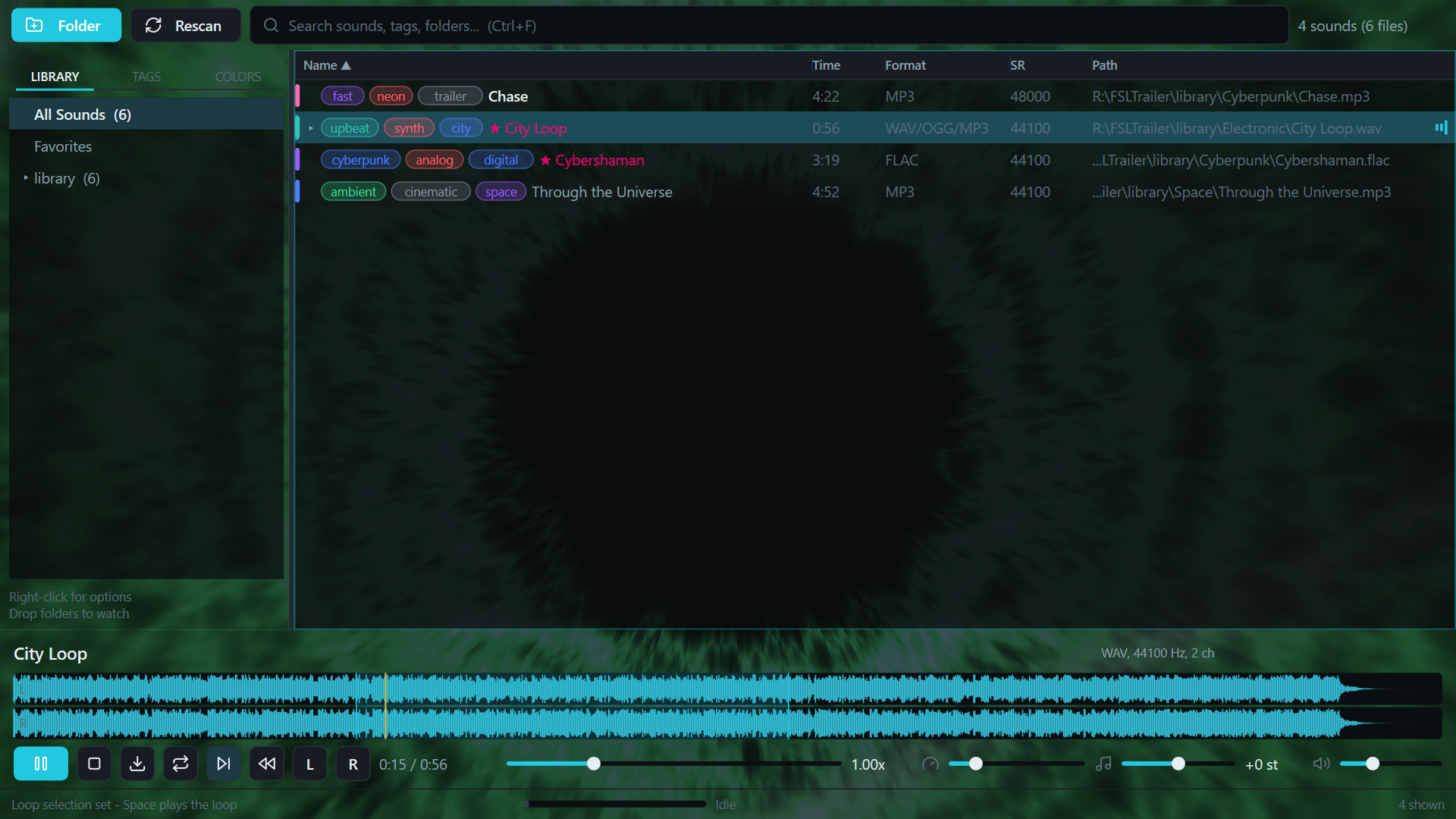
FSL is a native C++ Windows/macOS application built around one workflow: type to search, use the arrow keys to audition results, and drag the sound into a DAW or another application. It also has tags, favorites, waveform scrubbing, loop regions, reverse playback, speed and pitch controls, but those features all have to stay out of the way of browsing.
The main requirement was speed. I did not want an application that merely looked minimal while doing a large amount of work behind the scenes. Startup, search, rendering, decoding, and playback all had to be designed around that requirement.
A hardware-accelerated interface
FSL does not use Electron or a general-purpose cross-platform UI framework. I wrote a small retained-mode UI system on top of Win32, Direct2D and DirectWrite. The renderer creates a D3D11 hardware device and presents through a DXGI flip-model swap chain. The maximum frame latency is set to one, which keeps input and drawing responsive. There is a WARP fallback for machines where a hardware D3D device cannot be created, but the normal path is GPU accelerated.
This is not just used for a decorative visualizer. The complete interface, including the library, waveform, text, SVG icons and controls, is rendered through Direct2D on the D3D11 surface. Some visualizer backgrounds also use HLSL shaders directly.
The UI is retained rather than redrawn as a pile of unrelated immediate-mode calls. Controls form an element tree with measure, arrange and paint passes. Dirty flags determine what needs another layout or paint pass. The library list is virtualized, so a library containing thousands of files still only creates and paints the rows visible on screen.
The DXGI swap chain uses two buffers and flip-sequential presentation. Combined with a 60 Hz transport tick and a one-frame latency limit, it feels like a native tool because it is one.
Loading a library without decoding it
Scanning an audio library and playing an audio file are separate jobs in FSL.
When a folder is added, FSL first enumerates files and filters them by supported extension. It does not decode every file just to put it in the library. The second phase performs a lightweight metadata probe to read the duration, sample rate, channel count and format. Media Foundation handles the normal Windows codecs, and ffprobe can fill in the gaps when FFmpeg is available.
The resulting index is kept in memory and saved as JSON under the user's local application data folder. On the next launch, FSL loads that index directly instead of scanning and decoding the complete library again. Paths and numeric IDs have their own lookup tables, while search uses a prebuilt lowercase search blob and a lazily rebuilt name order. Typing into the search box does one pass over the existing index without sorting the complete result again for every key press.
A full rescan runs away from the UI thread. Directory enumeration stays single threaded so several iterators do not fight over the same disk, then metadata probing is distributed across a small worker pool bounded by the machine's hardware concurrency. Routine saves have their own thread and are debounced, so changing a tag does not perform disk I/O inside an input handler.
FSL also watches library folders with ReadDirectoryChangesW using overlapped I/O. Added, removed, modified and renamed files update the index in the background. This avoids the usual choice between constantly rescanning a library and letting it become stale.
Fast auditioning and broad codec support
The expensive part, a full audio decode, only happens when a sound is selected for playback.
That decode runs on a dedicated worker thread. Audition requests use a generation number, so moving quickly through the list cancels stale work and makes the newest selection win. The UI thread remains free to handle input while Media Foundation or FFmpeg opens the file. Recently decoded sounds are kept in a small LRU-style cache, limited to three entries and 256 MB, which makes moving back and forth between nearby results nearly instant.
Media Foundation is the first decoder for WAV, AIFF, MP3, FLAC, M4A, WMA, OGG and the other formats available through the installed Windows codecs. If it cannot open a file, FSL can fall back to FFmpeg. That adds formats such as APE, Opus, tracker modules, WavPack and quite a few older or less common codecs without making FFmpeg a requirement for ordinary use.
The decoder converts audio to interleaved 32-bit floating point PCM. Files that decode to less than 64 MB stay in memory. Larger previews spill to a temporary file and are memory mapped, so opening a long recording does not require one enormous allocation. A peak envelope for the waveform is generated once when the file loads rather than being recalculated every frame.
Playback goes through XAudio2. The decoded buffer is submitted to a source voice, and XAudio2 handles low-latency playback, seeking, looping and frequency-ratio changes. Loop selections are sent as actual XAudio2 loop points. Speed and pitch use the source voice frequency ratio, which gives FSL its 0.25x to 4x varispeed range without rebuilding the buffer every time a control moves.
The result is the application I wanted in the first place: local, hardware accelerated, quick to open, and quick to audition. There is no account to create, no subscription to maintain, and no attempt to move a sound library into somebody else's cloud. FSL opens the folders I already have and lets me get back to work.
You can try the offline web edition at fastsoundlibrary.com. The native Windows edition is also coming to Steam.