Vectors and Coordinate Spaces
The camera, intersection, and lighting systems of a renderer are all expressed in terms of a relatively small set of vector operations. This chapter is not intended as a general treatment of linear algebra; instead, it establishes the vector calculus and coordinate-space distinctions that must remain reliable throughout a rendering implementation.
A three-dimensional vector is stored as three scalar components, yet the same storage representation may stand for several mathematically different quantities. A point identifies a location relative to a chosen origin, a direction represents a displacement independent of location, and a normal represents an oriented covector associated with a surface. These objects may all be written as triples in a simple implementation, but they must not be treated interchangeably, because translation, scaling, and changes of basis affect them differently.
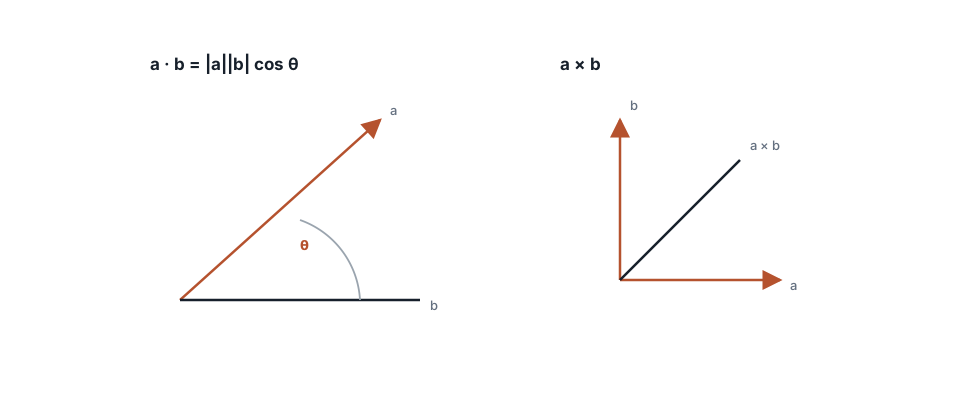
The dot product quantifies directional alignment, while the cross product constructs an axis perpendicular to its two operands.
Fundamental operations
Vector addition and subtraction describe displacement: the directed vector from point $\mathbf{a}$ to point $\mathbf{b}$ is $\mathbf{b}-\mathbf{a}$. Scalar multiplication changes magnitude without changing direction, which is why the parametric ray equation advances from an origin by a scalar distance along a direction. The Euclidean length of a vector is
$$ |\mathbf{v}| = \sqrt{v_x^2 + v_y^2 + v_z^2}. $$
Normalization divides a nonzero vector by that length and produces a unit vector:
$$ \operatorname{normalize}(\mathbf{v}) = \frac{\mathbf{v}}{|\mathbf{v}|}. $$
Unit directions are required wherever a formula is interpreted geometrically in terms of an angle or a cosine. Positions, by contrast, are not normalized, and repeated normalization of a value already known to be unit length introduces unnecessary work and can obscure the point at which numerical drift was introduced.
The dot product provides the principal measure of alignment:
$$ \mathbf{a}\cdot\mathbf{b} = a_xb_x+a_yb_y+a_zb_z = |\mathbf{a}|,|\mathbf{b}|\cos\theta. $$
When both operands are unit vectors, the dot product is the cosine of their enclosed angle. This fact explains the occurrence of $\mathbf{n}\cdot\mathbf{l}$ in diffuse illumination, where a negative result indicates that the light direction lies behind the geometric surface. The cross product, in contrast, constructs a perpendicular direction and is central to camera frames and triangle orientation:
$$ \mathbf{a}\times\mathbf{b}= \begin{pmatrix} a_yb_z-a_zb_y\ a_zb_x-a_xb_z\ a_xb_y-a_yb_x \end{pmatrix}. $$
Its operand order matters. Within a right-handed coordinate system, $\mathbf{x}\times\mathbf{y}=\mathbf{z}$, whereas reversing the order reverses the resulting orientation.
Points, directions, and normals
The practical distinction among these quantities is most apparent under transformation:
- Points are transformed by the complete affine matrix, including translation.
- Directions are transformed only by the linear $3\times3$ portion, because a direction has no location to translate.
- Normals are transformed by the inverse transpose of that linear portion, a requirement that becomes essential under non-uniform scale.
Applying a translation to a lighting direction changes its meaning entirely, while transforming a normal as if it were a point produces visibly incorrect terminators on scaled objects. A renderer may use a single vector type for efficiency or convenience, but its API should make the semantic distinction evident at every transformation boundary.
Coordinate spaces
A scene is normally described in several coordinate systems: object space, where a mesh is authored; world space, where instances are placed; camera space, where positions are expressed relative to the observer; and raster space, where image samples are indexed. Intersection may be performed either in world space or by transforming rays into object space, but a shape implementation must adopt one policy consistently so that its hit distances, normals, and texture coordinates have an unambiguous interpretation.
Orthonormal camera frames
A camera frame consists of three mutually perpendicular unit axes. Given an intended viewing direction $\mathbf{w}$ and an approximate up vector, one common construction is
w = normalize(look)
u = normalize(cross(up, w))   // choose the order for the chosen handedness
v = cross(w, u)
When the supplied up vector is nearly parallel to the viewing direction, the first cross product becomes ill-conditioned and the frame collapses. A robust camera therefore selects a fallback up direction in that case. Many apparent intersection failures are in fact failures of this basis construction, since a distorted or reflected frame generates incorrect rays before the intersection system is reached.
Numerical discipline
Rendering code should use unit directions whenever a formula assumes cosines, employ an epsilon for near-zero denominators and near-parallel tests, and avoid exact equality comparisons after floating-point transformations. The zero vector deserves explicit treatment, particularly after a cross product, because normalizing it converts a diagnosable geometric degeneracy into a field of invalid numerical values.
The following identities are useful both for implementation and for unit tests:
$$ \begin{aligned} |\mathbf{a}\times\mathbf{b}|&=|\mathbf{a}|,|\mathbf{b}|\sin\theta,\ (\mathbf{a}\cdot\mathbf{b})^2+|\mathbf{a}\times\mathbf{b}|^2&=|\mathbf{a}|^2|\mathbf{b}|^2,\ \operatorname{reflect}(\mathbf{i},\mathbf{n})&=\mathbf{i}-2(\mathbf{i}\cdot\mathbf{n})\mathbf{n}. \end{aligned} $$
A small test suite for normalization, dot products, cross products, and reflection should verify known axes, orthogonality, and lengths within an explicit tolerance. The vector layer is deliberately unglamorous, but its correctness determines whether every subsequent subsystem is interpretable.