Normals and Transforms
Transform support is where otherwise correct local intersection code frequently begins to exhibit black self-intersection artifacts and inverted illumination, because positions have been moved into a new coordinate frame while the associated normals have not been transformed according to their geometric role.
Points, directions, and normals respond differently to an affine transformation, and treating them as interchangeable triples is precisely what causes non-uniformly scaled instances to shade incorrectly.
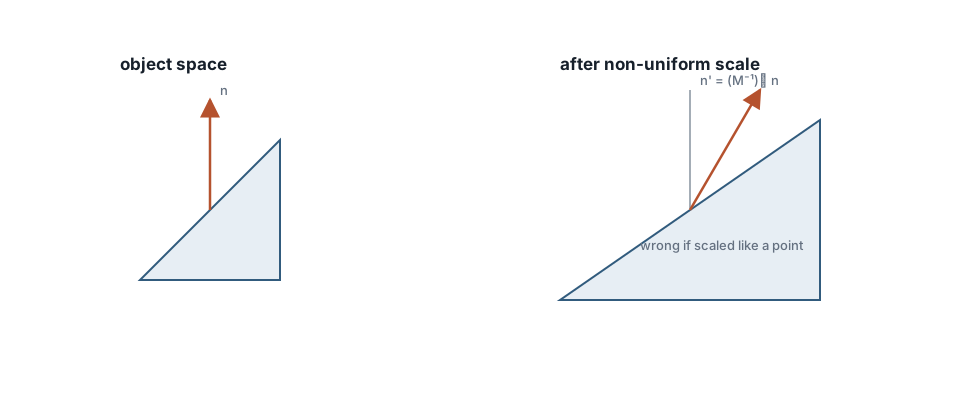
Under non-uniform scale, normals use n' = normalize((M⁻¹)ᵀ n). Directions do not.
Transform rules
Let M be object-to-world and M_linear its linear 3×3 part.
| Quantity | Transform |
|---|---|
| Point | p' = M p |
| Direction | d' = M_linear d |
| Normal | n' = normalize((M_linear⁻¹)ᵀ n) |
Why the special normal rule? A normal is defined by orthogonality to surface tangents. Applying the same matrix used for positions destroys that relationship under non-uniform scale. The inverse transpose restores n · t = 0 for transformed tangents.
Uniform scale often conceals an incorrect normal transformation, while non-uniform scale and shear expose it immediately; rotation alone preserves the relevant perpendicularity, but scaling one axis independently does not.
Ray in object space vs object in world space
Two valid strategies:
- Transform geometry into world space once and intersect there.
- Keep geometry local, transform the ray into object space, intersect, map the hit back.
Instancing prefers (2). Many instances share one mesh and carry different matrices.
$$ \begin{aligned} \mathbf{o}{\mathrm{local}} &= M^{-1}\mathbf{o}{\mathrm{world}} \ \mathbf{d}{\mathrm{local}} &= M{\mathrm{linear}}^{-1}\mathbf{d}_{\mathrm{world}} \end{aligned} $$
Do not casually normalize d_local if you still need a world-space t without conversion. Either keep a careful metric conversion or recompute:
$$ \begin{aligned} \mathbf{p}{\mathrm{world}} &= M,\mathbf{p}{\mathrm{local}} \ \mathbf{n}{\mathrm{world}} &= \operatorname{normalize}\bigl((M{\mathrm{linear}}^{-1})^{\mathsf{T}}\mathbf{n}_{\mathrm{local}}\bigr) \end{aligned} $$
Cache (M_linear⁻¹)ᵀ on the instance. Inverting per hit is wasteful and an excellent source of NaNs on singular matrices.
Front faces after transforms
A negative determinant flips handedness. A front face may become a back face. Evaluate front_face from the final world-space normal and ray direction after transformation. Doing it earlier is wrong for scaled instances and ruins refraction side tests.
Skinning and animation
Skinning blends several matrices. Normals still require the inverse transpose of the blended linear part, or an equivalent carefully constructed normal matrix. Shortcuts appear as seams when lights move.
For rigid motion, normals may ride the rotation. As soon as authoring tools apply non-uniform scale, the full normal matrix path must exist in code, not in a comment.
Debug sequence
- Render world-space normals as RGB.
- Render
front_faceas white/black. - Move the light, not the camera, and watch the terminator.
- Apply rotation only, then translation only, then non-uniform scale.
When step 4 breaks, stop editing the BRDF.
Common errors
- Applying translation to normals
- Forgetting to renormalize after the inverse transpose
- Mixing object-space normals with world-space lights
- Sharing one inverse matrix across instances
- Assuming the UI scale was uniform because the handles looked even
When lighting looks half inverted, inspect normals before materials. The normal image is the argument settler.
Determinant sign
$$ \det(M_{\mathrm{linear}}) < 0 \implies \text{handedness flips} $$
Mirrored instances are common in level design. If your front-face test ignores the determinant, one tree in a mirrored row will light inside-out. Detect mirrors explicitly or always evaluate front face in final world space.
Normal matrix cache
Store both M and N = (M_linear⁻¹)ᵀ on each instance at creation or when the transform dirty flag is set. Do not invert in the inner hit loop. Singular or near-singular scales should fail loudly during update, not during rendering as silent NaNs in the frame buffer.