Commands: From UI to Game Logic
A right-click, command-button press, or target selection is not applied directly to a selected object. In a synchronized RTS, the user interface must translate a local interaction into a semantic command that game logic can execute under the same ordering rules as every other player. The relevant Zero Hour boundary is visible in GameClient/InGameUI.cpp, GameClient/ControlBar.h, and GameClient/MessageStream/CommandXlat.cpp.
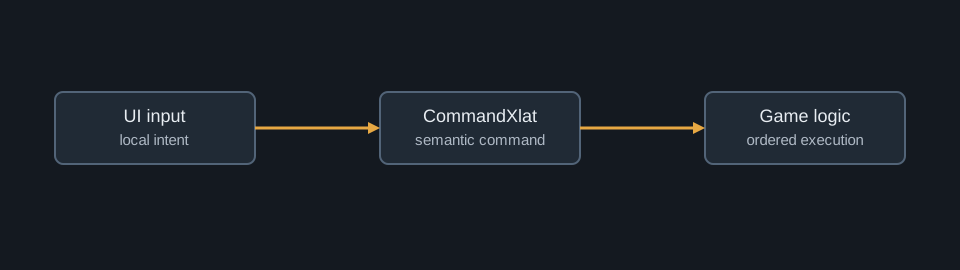
An input is not yet an order
The control bar and in-game UI determine what the local player can see and select. They may present a command, enter a targeting mode, draw feedback, or update the cursor, but they should not mutate authoritative object state merely because a button was clicked. A screen coordinate and a mouse button are input facts, not simulation facts. They must first be resolved into a command with a meaning that is stable across peers.
The command translator is the critical handoff. It interprets the UI action, packages relevant object and target data, and forwards a command into the game-facing message path. The semantic command can be represented abstractly as:
$$ c = (\text{issuer},\ \text{action},\ \text{target},\ \text{parameters}). $$
The exact binary layout is not the important point for a source trace. The important point is that a local interaction is converted into a representation whose meaning does not depend on the local widget tree or viewport.
pointer event
    -> selection and targeting context in InGameUI
    -> action interpretation in CommandXlat
    -> semantic command placed in the message path
    -> frame assignment, validation, and logic dispatch
This distinction explains why targeted commands need more than a button callback. The UI establishes pending command context; subsequent terrain or object interaction resolves a target; the translator chooses a semantic command; and the simulation later validates and executes it. Selection, cursor feedback, and command availability are client concerns. The resulting order is a simulation concern.
Target resolution preserves meaning
The UI can show a ground reticle, a target cursor, or a command button state before it knows whether an order will be accepted by logic. It may raycast or otherwise identify a client-visible object, but the eventual command needs an identity or position that can be interpreted by the authoritative object and map systems. The recipient then evaluates current state: ownership, ability availability, target legality, range, resources, and other rule-specific predicates.
This separation avoids the false assumption that visual availability is authorization. A command button can be visible when a unit is selected, while the order itself remains subject to logic-side conditions when it is dispatched. Conversely, a client can present failure feedback after a rule rejection without the UI becoming the owner of that rule.
Follow the message, not the widget
For a source trace, begin at InGameUI.cpp or control-bar code, then follow calls into MessageStream/CommandXlat.cpp. From there, inspect command and network layers rather than continuing to search in UI code. GameLogicDispatch.cpp and GameLogic.cpp are appropriate destinations for the final effect, while NetCommandList.cpp and related frame code explain how the command reaches a deterministic execution point.
The order of operations is conventionally expressed as a composition:
$$ S_{f+1} = \operatorname{Dispatch}(S_f,\operatorname{Order}(\operatorname{Translate}(u))). $$
Here u is local UI input. Translation assigns meaning; ordering assigns a shared execution position; dispatch changes the authoritative state. The equation deliberately excludes cursor animation and local UI transitions because they do not belong in the authoritative result.
The practical lesson is general: UI code describes intent and presentation; command translation describes meaning; game logic changes the world. Keeping these responsibilities distinct is what allows a local click to become a synchronized RTS action rather than an unsafe local mutation.