Reading the Generals Engine
Command and Conquer: Generals and Zero Hour are easiest to understand as a deliberately separated RTS stack rather than as a single monolithic game loop. The Zero Hour source is principally under GeneralsMD/Code. GameEngine contains the game-facing abstractions and much of the portable implementation, while GameEngineDevice contains concrete device and W3D implementations. The neighboring Generals tree is valuable for historical comparison, but it is not the primary source for a Zero Hour behavior claim.
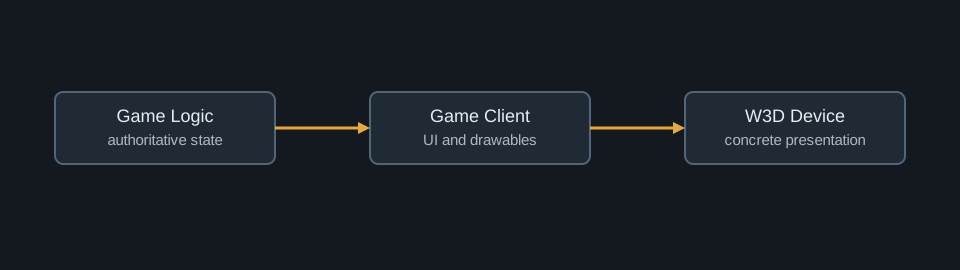
The layer is part of the answer
Every source-reading question should begin by assigning the observed behavior to a layer. The three useful categories are authoritative simulation state, client presentation state, and device implementation. Game logic owns objects, players, weapons, maps, AI, scripts, and the rules by which a simulation frame changes. Representative entry points are GameLogic/System/GameLogic.cpp and GameLogic/System/GameLogicDispatch.cpp. GameClient owns interaction and client-facing representations such as InGameUI, ControlBar, and Drawable. The W3D device tree implements concrete terrain, scene, view, particle, UI, and display work.
This is more than a directory convention. It is the boundary that prevents a local cursor update, a frame-rate dependent particle, or a graphics allocation from becoming an authoritative gameplay change. A terrain surface may be visible through W3DTerrainVisual.cpp, but gameplay height and passability belong to terrain logic. A selected unit may have a client Drawable, while health, commandability, and AI are held by the simulation object. Treating a W3D class as the source of a gameplay rule is therefore a category error.
Frame ownership and the simulation boundary
The simulation can be modeled as a state transition. At logic frame f, authoritative state S_f and the frame's ordered commands C_f produce the next state:
$$ S_{f+1} = F(S_f, C_f). $$
The client reads a presentation-oriented projection of this state, together with purely local state such as pointer position, UI animation, and window focus. That relation is deliberately one-way for ordinary rendering:
$$ P_f = R(S_f, L_f), $$
where P_f is the visible presentation and L_f is client-local information. The function R can run at a display-oriented cadence without changing the result of F. This distinction explains why rendering code can interpolate, cull, or skip work without changing the match.
logic frame:
    collect ordered commands for frame f
    apply commands to authoritative objects
    update rules, AI, weapons, and terrain interactions
    publish client-visible state

client frame:
    read visible state
    update UI and camera feedback
    submit W3D scene work
The listing is schematic rather than a verbatim loop. Its purpose is to identify the ownership handoff: logic publishes state; the client consumes it; W3D realizes it on the device.
Traversing a feature end to end
A disciplined trace follows the direction of the question. For an input question, start in GameClient/InGameUI.cpp or the control bar, continue through GameClient/MessageStream/CommandXlat.cpp, then cross into game-logic dispatch and the frame command infrastructure. For an AI question, start with the strategic or object-level class under GameLogic/AI, then inspect the object and weapon systems it modifies. For a visual issue, start at the W3D view, scene, or buffer that produces the pixels, and work backward to the client representation and logic data that it consumes.
The reverse direction is equally important. A gameplay rule should first be established in the logic owner, then followed forward to the client representation that exposes it. For example, a selection circle can be traced from object state through client presentation to W3DStatusCircle, but the visible circle does not prove where selection was authorized.
A practical first pass through the source
Begin with the common layer. Common/Thing/ThingTemplate.cpp, ThingFactory.cpp, ModuleFactory.cpp, and Module.cpp explain how authored definitions become concrete objects. Continue into GameLogic/Object and GameLogic/AI to follow runtime behavior. Read GameClient/MessageStream/CommandXlat.cpp with GameClient/InGameUI.cpp to see how player input becomes a command. Finally, cross into GameNetwork/FrameDataManager.cpp, NetCommandList.cpp, and GameLogic.cpp when the question concerns synchronization or execution ordering.
The source is large, but its naming is unusually descriptive once the layer boundary is respected. This booklet uses those boundaries as the organizing principle: data creates the object, input becomes a command, commands advance a shared simulation, AI creates further intent, and W3D presents the result.